Bug with | operator in Regular Expressions check (QA)

I have found what seems to be a bug in Trados Studio 2017 SR1 in Regular Expressions check (QA)


This is my setting:
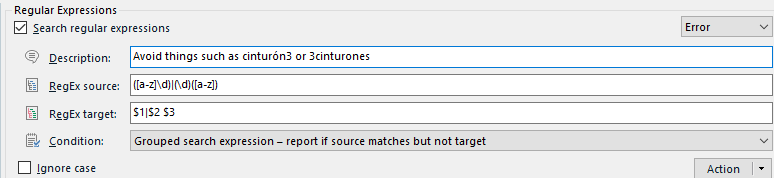
Trados Studio Regular Expressions settings with an error in the description 'Avoid things such as cintur n3 or 3cinturones'.

The intention is to avoid things in target such as numbers stickings together to words in lowercase, or words to numbers. So cinturón3 or 3cinturones in target should be WRONG. However, if source has something like 3mm, it its ok if target has 3 mm (with a space), and wrong otherwise. The weird thing comes here: in the sentence...

Trados Studio QA check showing an error message for the target segment 'cintur n3 or 3cinturones' found in source but not in target.

Notice that, instead of recognizing the symbol "|" as an OR operator, it's interpreting it LITERALLY! It's weird, because first, it does not have the "\" symbol ahead of it in order to take it literally. My only guess is that the OR operator does not work WITH Grouped conditions. I have tested the OR oeprator "|" and it definitely works in the target field in the rest of the cases. For instance, this works PERFECTLY as intended.
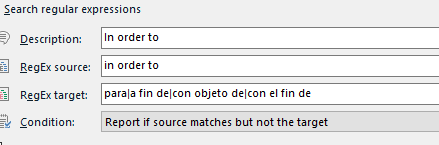
Trados Studio Regular Expressions settings showing a correct setup for the phrase 'In order to' with the condition 'Report if source matches but not the target'.


As far as I can guess, I see no reason for the "|" operator to be disabled in Grouped search expressions. I have not tested in Grouped search expression: Report if source and target matches.

So is this a bug or it is intended for some reason??? It's a shame because I love the functionality and possibilities.


Generated Image Alt-Text
[edited by: Trados AI at 4:04 AM (GMT 0) on 5 Mar 2024]

emoji
Parents
  • Unknown said:

    I have tested the OR oeprator "|" and it definitely works in the target field in the rest of the cases. For instance, this works PERFECTLY as intended.

    Screenshot of Trados Studio's 'Search regular expressions' dialog box with fields filled in. Description: 'In order to', RegEx source: 'in order to', RegEx target: 'parafin delcon objeto decon el fin de', Condition: 'Report if source matches but not the target'.

    This works because it's not a Grouped expression using back references.  It's a simple search in source and a search in target.

    Paul Filkin | RWS

    Design your own training!
    You've done the courses and still need to go a little further, or still not clear? 
    Tell us what you need in our Community Solutions Hub

    emoji


    Generated Image Alt-Text
    [edited by: Trados AI at 4:04 AM (GMT 0) on 5 Mar 2024]
  • The other case is the same.. remember, we are not talking about a Search and Replace here! We are talking about a Regex Expression for source, and a Regex expression for target in both cases! The only difference is that one case, they are grouped, in the other, the are not, but we are never replacing anything!

    Either both should work or both should not. It's true that Search and Replace use different syntax and only $1 may be used, but this is not the case... (am I explaining myself?)

  • Ignacio Niveiro said:
    The other case is the same.. remember, we are not talking about a Search and Replace here! We are talking about a Regex Expression for source, and a Regex expression for target in both cases!

    They are not the same.

    One is a "Grouped Search Expression" which means it can use the results of the search in the target (via a back reference) and any other normal characters you want in the target.

    The other is searching in both the source and the target.  It does not use the results of one as the basis of a search in the other.

    Paul Filkin | RWS

    Design your own training!
    You've done the courses and still need to go a little further, or still not clear? 
    Tell us what you need in our Community Solutions Hub

Reply
  • Ignacio Niveiro said:
    The other case is the same.. remember, we are not talking about a Search and Replace here! We are talking about a Regex Expression for source, and a Regex expression for target in both cases!

    They are not the same.

    One is a "Grouped Search Expression" which means it can use the results of the search in the target (via a back reference) and any other normal characters you want in the target.

    The other is searching in both the source and the target.  It does not use the results of one as the basis of a search in the other.

    Paul Filkin | RWS

    Design your own training!
    You've done the courses and still need to go a little further, or still not clear? 
    Tell us what you need in our Community Solutions Hub

Children
No Data