
Issues with Terbase and WSXZ packages

Hello Support Team,

I am contacting you again because the issue with termbases in Trados Studio 2024 has still not been resolved.

I recently moved my Trados license to a new computer and since then I have been experiencing several issues related to MultiTerm and termbase integration.

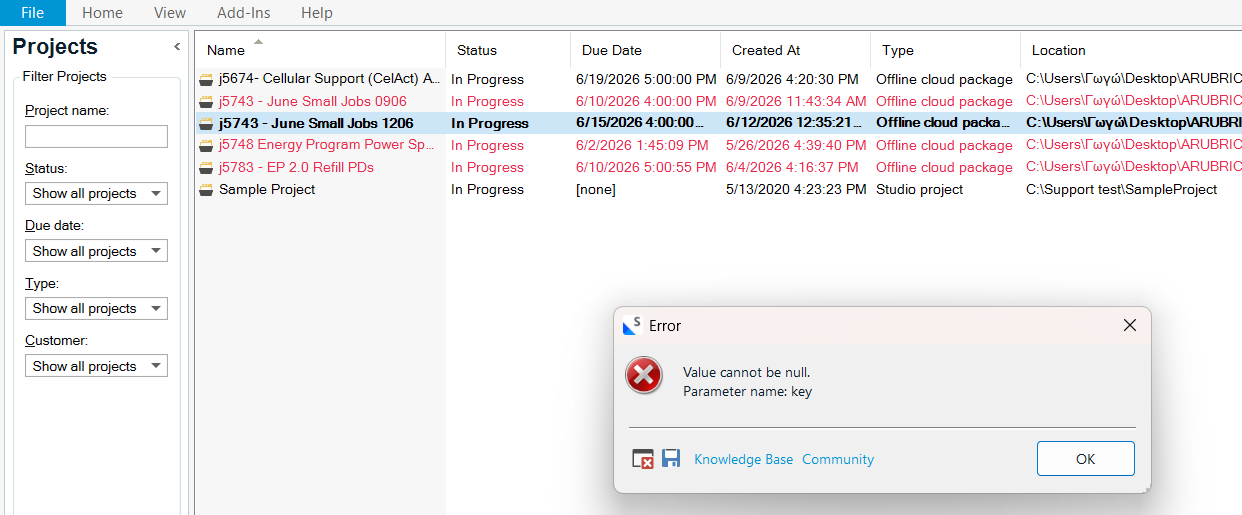
The current problem is that when I try to open Project Settings in order to add or manage a termbase, Trados displays the following error message:

Value cannot be null. Parameter name: key - Please see below the different error messages with different projects

As a result, I am unable to add termbases to my projects. This affects both existing projects and my ability to work normally with terminology resources.

Also, I can not open a Wordserver package - when I click to open the package it opens Trados but not the project without any error messages.

Please contact me asap as I have to travel for work and I am struggling with these issues for more than a week now.

Alkistis Markoulaki


Removed AI Suggestion
[edited by: Alkistis Markoulaki at 11:07 AM (GMT 1) on 12 Jun 2026]

emoji
Parents
  • Hello Alkistis,

    I understand how frustrating it can be to face these issues, especially when you're on a tight schedule. Let me guide you through resolving the problems with termbases and WSXZ packages in Trados Studio 2024.

    ### Issue 1: Termbase Integration Error ("Value cannot be null. Parameter name: key")

    This error often occurs due to a misconfiguration or corruption in the MultiTerm setup. Here's how you can address it:

    **Step 1:** Ensure MultiTerm is Installed and Updated  

    - Verify that MultiTerm 2024 is installed on your new computer. Trados Studio relies on MultiTerm for termbase functionality.  

    - Check for updates for both Trados Studio 2024 and MultiTerm 2024. You can do this directly within the applications under the "Help" menu by selecting "Check for Updates."

    **Step 2:** Reset User Settings  

    - Use the Trados FreshStart app from the RWS AppStore to reset your Trados Studio and MultiTerm settings. This can resolve configuration issues that might have occurred during the license transfer.  

    - After resetting, reconfigure your termbase settings in Trados Studio.

    **Step 3:** Reconnect Termbases  

    -

    emoji
Reply
  • Hello Alkistis,

    I understand how frustrating it can be to face these issues, especially when you're on a tight schedule. Let me guide you through resolving the problems with termbases and WSXZ packages in Trados Studio 2024.

    ### Issue 1: Termbase Integration Error ("Value cannot be null. Parameter name: key")

    This error often occurs due to a misconfiguration or corruption in the MultiTerm setup. Here's how you can address it:

    **Step 1:** Ensure MultiTerm is Installed and Updated  

    - Verify that MultiTerm 2024 is installed on your new computer. Trados Studio relies on MultiTerm for termbase functionality.  

    - Check for updates for both Trados Studio 2024 and MultiTerm 2024. You can do this directly within the applications under the "Help" menu by selecting "Check for Updates."

    **Step 2:** Reset User Settings  

    - Use the Trados FreshStart app from the RWS AppStore to reset your Trados Studio and MultiTerm settings. This can resolve configuration issues that might have occurred during the license transfer.  

    - After resetting, reconfigure your termbase settings in Trados Studio.

    **Step 3:** Reconnect Termbases  

    -

    emoji
Children
No Data