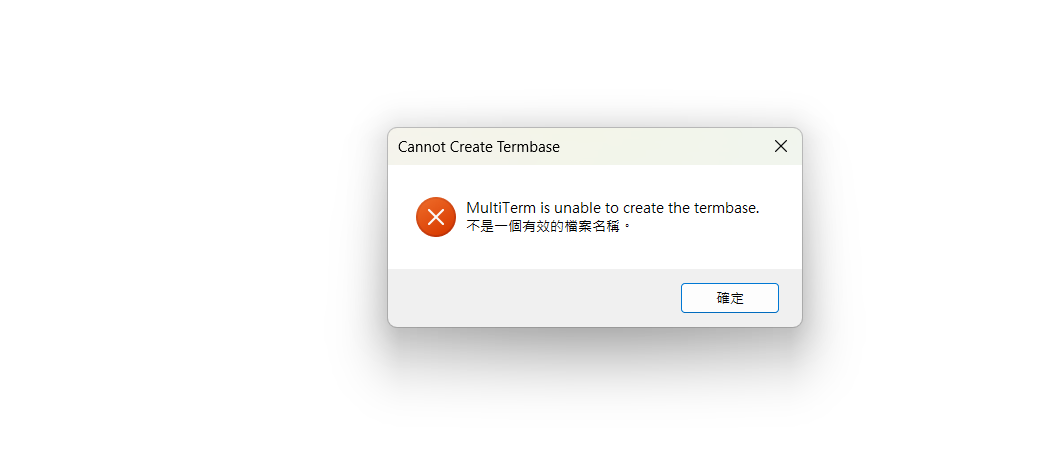
Cannot create new Termbase in Multiterm

Hi everyone,

I am new to Trados Studio and Multiterm.  I tried to create a new Termbase in Multiterm for several time but the message "Multiterm is unable to create the termbase. Not a vaild name" popped up.

May I ask how to solve this problem? 

regards

Jennifer 

emoji
Parents Reply Children
  •  

    The name looks ok... what's the path?

    Paul Filkin | RWS

    Design your own training!
    You've done the courses and still need to go a little further, or still not clear? 
    Tell us what you need in our Community Solutions Hub

    emoji
  • It is on the desktop.  Usually, files will sync to OneDrive.

    I also activate a firewall software.

    emoji
  •  

    Usually, files will sync to OneDrive.

    This is also a potential cause for problems.  Try copying the termbase to a location that is not synched with OneDrive.  The problem here is that files may be cloud only which means that whilst you can see them in your drive they are not actually there,,, only a footprint is made available by OneDrive.  When you select them to open them OneDrive will fetch them and then open them.  However, Studio will get different feedback and think that the file isn't available at all.

    Paul Filkin | RWS

    Design your own training!
    You've done the courses and still need to go a little further, or still not clear? 
    Tell us what you need in our Community Solutions Hub

    emoji
  • If I don’t sync Trados related items to One Drive, will I lose my storage when I use a new device? How can I retrieve them?

    emoji
  •  

    You should either make sure that the OneDrive files are ALWAYS present and not set to be cloud only... although I personally would not recommend using OneDrive at all for Trados projects/resources... or set up a backup routine to keep a copy of these resources in the cloud somewhere else so you don't work with them daily.

    Trados Studio does not support working with OneDrive so if you choose to work with it like this then it is something for you to address.

    Paul Filkin | RWS

    Design your own training!
    You've done the courses and still need to go a little further, or still not clear? 
    Tell us what you need in our Community Solutions Hub

    emoji
  • Since OneDrive is a commonly used feature, it would be great if RWS to figure out a way for users to use both functions smoothly.  Why do users sacrifice just for using Trados?

    emoji
  •  

    It might be a common feature, but it doesn't mean you don't have to learn how to work with it properly.  When you store large files such as Translation Memories (TMs) and Termbases in OneDrive, various synchronisation issues can arise.  These issues often stem from the nature of cloud storage and the way large files are handled during the sync process.  While some of these issues may be outside your control, there are several aspects you can manage to mitigate potential problems.  For example:

    • Configure OneDrive to selectively sync folders that contain critical resources.  This can help avoid unnecessary data transfer and reduce the risk of sync conflicts.
    • Perhaps pause OneDrive syncing while actively working with large TMs and Termbases to prevent partial uploads or sync conflicts.
    • Maintain local backups of their TMs and Termbases to ensure data is not lost if a sync issue occurs. This practice helps in quickly restoring the resources without relying solely on cloud storage.

    OneDrive is no different to any other backup system, and it has not been built with support for specific software in mind.  I have other software on my computer that uses large files, like Camtasia for example, and this has the same problem.  So I have to manage what I'm doing and use these backup solutions appropriately.

    Trados does support you working in the cloud and we also provide you with cloud capabilities as part of your Trados licence.  But we don't support you working with shared drives as these are all tools that you can work with if you learn how to do this to support your needs.  They are not a one size fits all.

    Paul Filkin | RWS

    Design your own training!
    You've done the courses and still need to go a little further, or still not clear? 
    Tell us what you need in our Community Solutions Hub

    emoji
  • I tried to create Termbase while turning off the sync function of OneDrive but still fail. 

    The message is shown as attached. it is in one line English, one line Chinese.  Does it mean anything?

    Error dialog box titled 'Cannot Create Termbase' with a red X icon. Message: 'MultiTerm is unable to create the termbase.' followed by Chinese text. Button labeled 'OK' in Chinese.

    emoji


    Generated Image Alt-Text
    [edited by: RWS Community AI at 10:50 AM (GMT 1) on 26 Jul 2024]
  •  

    Try creating it in a folder where you don't use OneDrive at all?  You still have not provided the full path so we can see where you are instructing MultiTerm to create the termbase.  Can you provide that?

    Paul Filkin | RWS

    Design your own training!
    You've done the courses and still need to go a little further, or still not clear? 
    Tell us what you need in our Community Solutions Hub

    emoji
  • Former Member
    0 Former Member in reply to Jennifer Chu

    Jennifer, "New Termbase" (that is, "New Termbase.sdltb") is the default name when creating a termbase. You can keep it like that or use a name to your liking. Question: if your computer OS is in Chinese, do you mean to say that "New Termbase" is written in Chinese characters? In English? Please, clarify.

    Regarding your computer OS in Chinese, the issue about your inability to create a new termbase may be due to how Windows handles the name of your termbase. First of all, there are forbidden characters when naming a file or a folder, these include <, >, :, /, \, |, ?, ", and *. Obviously, in a PC in Chinese, Windows will replace these characters accordingly with different Unicode characters to ensure file name compatibility.

    I will surmise that the regional settings you are using in your PC are set to use a non-Unicode code page, such as GBK (also known as GB2312 or CP936), which can lead to issues with file naming and character representation.

    To solve these issues with GBK in Windows, you can try changing the code page to a Unicode-compatible setting:

    1. Go to **Control Panel** > **Region and Language**
    2. Click on **Change date, time, or number format** (or equivalent)
    3. Select **Unicode** as the default language
    4. Restart your system.

    Summarizing, your problem is related to whether the character encoding in your PC is based on GBK or on Unicode. (my guess).

    On the other hand, whether using OneDrive (or Google Drive) or not, does not make any difference.

    emoji