Multiterm Convert. Error: The conversion option could not be initialised properly. The file cannot be opened in Microsoft Excel.

Hi! 

I tried to create a termbase from an MS Excel glossary using MultiTerm Convert, but when I start the conversion and select the input file and click Next an error message appears: "The conversion option could not be initialised properly. The file cannot be opened in Microsoft Excel". 

I already saw the RWS Support Guide (https://gateway.rws.com/csm?id=kb_article_view&sysparm_article=KB0033238), but the issue is not resolved.

My Pc version: Windows 10 Home 22H2

Multiterm version: Multiterm SR2 17.2.2.2737

Trados version: Trados Studio SR2 17.2.9.18688
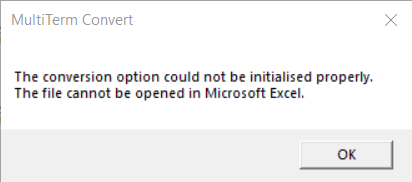
Error message in MultiTerm Convert stating 'The conversion option could not be initialised properly. The file cannot be opened in Microsoft Excel.' with an OK button.


Generated Image Alt-Text
[edited by: Trados AI at 9:45 AM (GMT 0) on 18 Mar 2024]

emoji
Parents Reply
  •  

    Thanks for your file.  I can reproduce the problem and I think I know the cause... it's OneDrive.  If I have the file here I get that message:

    c:\Users\pfilkin\OneDrive - RWS\Documents\SDL\TESTING\Vincenzo Russo\Glossary.xlsx

    If I have it here, then all is well:

    c:\Users\pfilkin\Documents\MT Convert\Glossary.xlsx

    I tried to making sure that the version in my One Drive folder was always available but that didn't help, the message is still there.  So the answer seems to be don't use any folders that are managed by OneDrive for these files.

    Paul Filkin | RWS

    Design your own training!
    You've done the courses and still need to go a little further, or still not clear? 
    Tell us what you need in our Community Solutions Hub

    emoji
Children