Impossible to charge Multiterm on my Trados Project.

I've got Trados and Multiterm 2022 licence. Very often I've problems in charging my multiterm (in the right language pair) into my Trados projects.
I
f I create a new project and I go on Project Settings trying to add my Multiterm when I select "add multiterm based on a file" and I look for it, Trados doesn't find it. I tried many times to restart my pc and Trados and to delete and recreate a new project but nothing change. I need to solve the problem as fast as I can. I Tried to contact the customer service chat but the were not able to solve my problem and suggested me to contact you as technical team. I can add some photos if you need them. Looking forward to read soon your kind reply, I thank you very much and I wish you good work.

emoji
  •  

    I go on Project Settings trying to add my Multiterm when I select "add multiterm based on a file" and I look for it, Trados doesn't find it.

    Can you confirm if you have an SDLTB or MDB file?  If you do can you share a screenshot of the "Open File-based Termbase" dialogue pointing to the location where your termbases are?  Like this for example:

    Can you also show a screenshot from your windows file system in the same folder, like this:

    This may help us identify where the problem lies and help us point you in the right direction.

    Paul Filkin | RWS

    Design your own training!
    You've done the courses and still need to go a little further, or still not clear? 
    Tell us what you need in our Community Solutions Hub

    emoji
  • Dear  thank you for your reply.

    I'm sorry but I can't charge my photos. If I go on Insert I can search among my file... Can you pls lead my way to charge them?

    emoji
  • Hi Paul,

    I have a ".sdltb" file.

    I'm sorry but I can't charge my photos because if I go on "insert" I can't browse among my files.

    Waiting for your kind reply.

    Thank you.

    emoji
  •   

    Perhaps, if I understand you correctly, you can just copy paste into here?  You don't have to load an image.

    But please feel free to ask your question in your native language.  Hopefully I'll be able to understand it well enough with a little technology and it may be easier for you to express yourself clearly.

    Paul Filkin | RWS

    Design your own training!
    You've done the courses and still need to go a little further, or still not clear? 
    Tell us what you need in our Community Solutions Hub

    emoji
  • Dear  ,

    thank you very much for you kind reply.

    Don't worry, I speak English and I hope being able to explain you clearly my problem.

    Since when I purchased my Trados/Multiterm license (recently updated with 2022 one), each time I create a new project I have, almost always, problems in charging my Multiterm ( ".sdltb" file).

    This is the path I follow:

    1) I open Trados Studio

    2) File > Traduci documento singolo

    3) I load my document and choose the language pair

    4) when it's asked to me to charge my translation memory, studio doesn't find my Multiterm,

    5) the window on the Right side "termbase research" (Ricerche nel termbase) is always gray instead of green and it doesn't allow me to insert my multiterm in any way,

    6) if I try to go on "translating memory" at the bottom on the left side, nothing appear to me; then if I cclick "open" ("apri") and I try to insert my multiterm, looking for it in the right position where I saved it, Trados studio doesn't find it...

    7)  I tried to delete and create a new project but nothing changed.

    As I told you yesterday, I tried many times to contact the customer service thorugh the chat. Sometimes they were able to help me but yesterday, after more than one hour and a half, nothing changed and they suggested me to contact the technical team. That's why I decided to write my post.

    Looking forward to receive the right information in order to solve once and forever my problem.

    Thank you very much.

    Maria

    emoji
  • Hi ,

    4) when it's asked to me to charge my translation memory, studio doesn't find my Multiterm,

    I followed your steps and I was a bit confused with this  paragraph in your post.

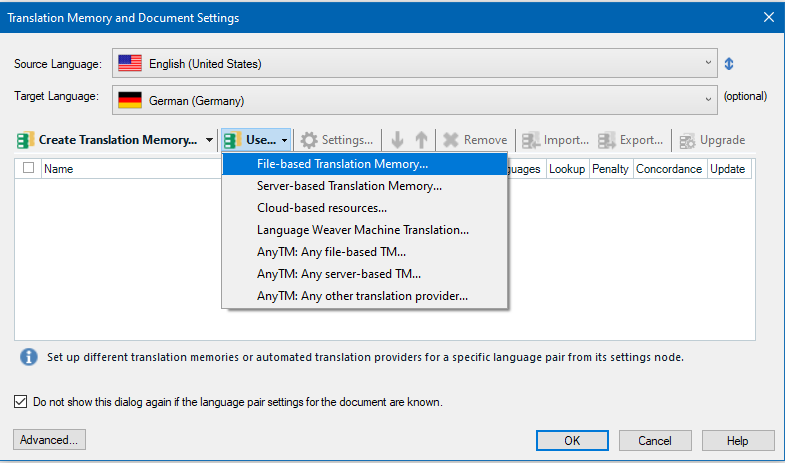
    Do you want to add a MultiTerm glossary or a Translation Memory?

    Do you want to add it from this step?

    Trados Studio Translation Memory and Document Settings dialog box with options to create, use, and manage translation memories. The 'File-based Translation Memory' option is highlighted.

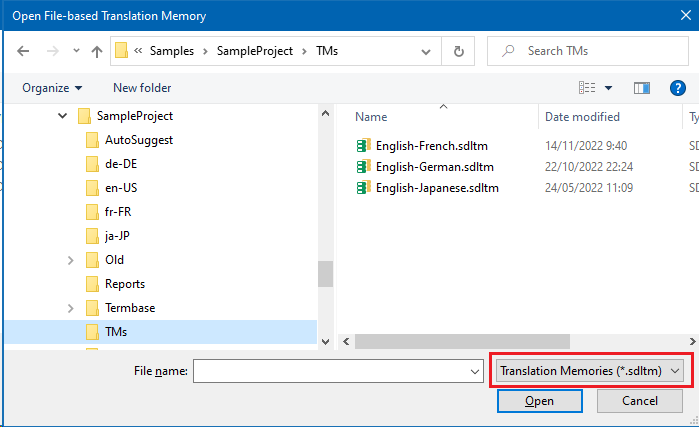
    From this dialog box, you'll only be able to add one or more translation memories (see the SDLTM filter highlighted in red colour below?):

    Open File-based Translation Memory dialog box showing a list of translation memories including English-French, English-German, and English-Japanese with the option to open selected files.

    emoji


    Generated Image Alt-Text
    [edited by: Trados AI at 2:13 PM (GMT 0) on 5 Mar 2024]