SDLTB file cannot be opened from outside Multiterm

Whenever I try to open a Multiterm file (SDLTB) by double clicking it or by using Open with... in Windows, Multiterm 2022 does open, but the termbase is not opened or shown.

After I have tried the above, within Multiterm, I click "Open termbase" but the said database is not even in the "Select Termbases" dialog box. I can open the termbase by browsing for it there, but it is annoying that I cannot open a termbase by double clicking it. This happened to me in the past with Multiterm 2021 too.

I have tried to reset Multiterm by renaming the Multiterm17 folder in \Users\%user%\AppData\Roaming\Trados\MultiTerm but it did not work. I even tried to delete registry entries with sdltb, as I recall that this worked (If I remember well) with project packages that did not open by double clicking on them.

Jesús

emoji
Parents Reply
  • Thank you. I fixed it.

    I followed Solution 2 of your KnowledgeBase article. I used the English Operating Sytem file, which works with Windows for the Spanish for Spain locale. I have Windows 10.

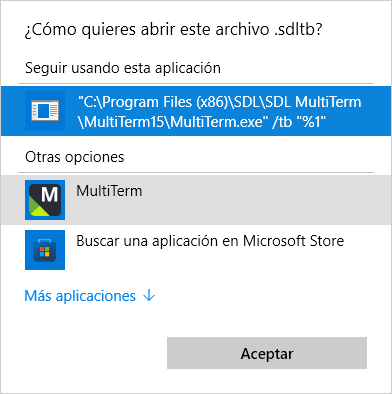
    However, after doing all the above, and double clicking an SDLTB file, I got the message below. I realised that an old file association was still in place. I am attaching the screenshot:

    Windows dialog message asking about the application to open an .sdltb file, and suggesting a Multiterm15 application.

    What I did is I went to the registry again, searched for "Multiterm15", and when I got a hit, I replaced the above path and used my actual Multiterm 2022 (Multiterm17) path instead, leaving the end parameters (/tb "%1") untouched ("C:\Program Files (x86)\Trados\MultiTerm\MultiTerm17\MultiTerm.exe" /tb "%1"). The registry hit actually was the open command for SDL Multiterm files.

    It now works.

    Best,

    Jesús

    emoji
Children