Help! The TB I used for my project is locked and became a "ldb" file

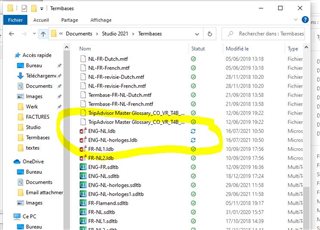
I worked on a big project and filled my TB with a lot of content. I was really happy with the new 2021 quick add function. Once finished I wanted to make a backup of my TB, but: its seems locked! If I filter on last modified I do see a file that corresponds to the date, but it is a "ldb" file and as said before it is locked. I tried to open that in another project, but impossible, gives me this error: "general error occured Multiterm ne peut pas extraire l'objet multimedia".

How can I unlock this file/ change the extension, so that I can use it for future projects?

Thanks for your help!

Trados Studio project settings window showing TermBases section with a locked TB highlighted.

File explorer window with a list of files, highlighting a locked 'ldb' file with a recent 'last modified' date.

Error message in Trados Studio stating 'general error occurred Multiterm cannot extract the multimedia object'.


Generated Image Alt-Text
[edited by: Trados AI at 2:04 PM (GMT 0) on 5 Mar 2024]

emoji
Parents Reply Children
  • You absolutely can use a file-based TM.  The problem is if you are backing it up at the same time as using it, and this is what happens if you are synching your files with something like onedrive.  You should use your resources like TMs and termbases on a local drive and only back then up when Studio is closed and you're not working with them.

    Alternatively, as you have 2021 you could use the termbase in Language Cloud.  That way it's always backed up as it is a server based TM.

    Paul Filkin | RWS

    Design your own training!
    You've done the courses and still need to go a little further, or still not clear? 
    Tell us what you need in our Community Solutions Hub

  • Hi Paul,

    I did not backup yet, I was just planning to backup the file, when I discovered it was locked/ a temporary file. I just did some updates on Microsoft and I restarted my computer twice but the file is still not updated:

    Screenshot of Trados Studio file explorer showing a list of files, with the 'Tempfolder Master Glossary_CO-YE-18.sdltb' file highlighted indicating it is locked or a temporary file.

    I will however save my future files on the cloud. Can I also save existing TB on the cloud (save as)? How can I do that? In Multiterm?

    Thanks,

    Floor

    emoji


    Generated Image Alt-Text
    [edited by: Trados AI at 2:04 PM (GMT 0) on 5 Mar 2024]
  • Can I also save existing TB on the cloud (save as)? How can I do that? In Multiterm?

    Yes you can.  You do it from Trados Live.   Best way is this:

    1. export your termbase definition and multiterm xml files from MultiTerm
    2. create a new termbase in Trados Live using the definition from MultiTerm
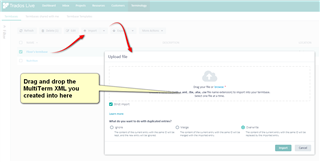
    3. Then drag and drop your MultiTerm XML into here:
      Trados Live interface showing the 'Upload File' section with an arrow pointing to the drag and drop area for MultiTerm XML files.

    So it's all done from the Cloud.

    Paul Filkin | RWS

    Design your own training!
    You've done the courses and still need to go a little further, or still not clear? 
    Tell us what you need in our Community Solutions Hub

    emoji


    Generated Image Alt-Text
    [edited by: Trados AI at 2:04 PM (GMT 0) on 5 Mar 2024]
  • Hi Paul,

    Thank you for your answer. I am not sure that I understand completely your steps for saving an existing TB on the cloud ... What do you mean by "definition". And where do I export the Multiterm files to? Do you have a more detailed explanation?

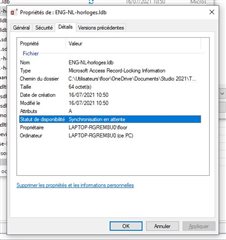
    As for my TB: it is still saying "synchronization on hold " (synchronisation en attente).

    Properties dialog box for ENG-NL_hortiges.ltb file showing file location, size, and creationmodification dates with a highlighted 'Synchronisation en attente' status indicating synchronization on hold.

    Best,

    Floor

    emoji


    Generated Image Alt-Text
    [edited by: Trados AI at 2:04 PM (GMT 0) on 5 Mar 2024]
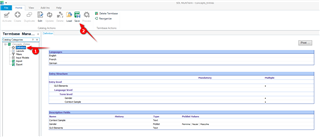
  • Open MultiTerm and save the definition file from here like this:

    Screenshot of Trados Studio MultiTerm with an arrow pointing to the 'Definition' tab being selected.

    1. click on "definition"
    2. click on "save"

    This will get you an *.xdt file which is a file explaining to an application that understands this what the structure of your termbase is.

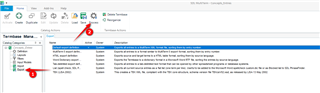
    Then go here and export:

    Screenshot of Trados Studio MultiTerm with arrows pointing to the 'Export' button and 'Process' button in the export section.

    1. click on "Export"
    2. click on "Process"

    This will get you an *.xml file which contains al the entries in your termbase.

    You can save both files wherever you like... probably a folder on your desktop seems a good idea.

    Then create your cloud termbase using the *.xdt file, and once created import the *.xml into it.

    As for your TB... it does sound as though some synchronisation software has got hold of the files and locked them.  OneDrive could do this.  If you have a back up of your termbase then I'd use that.  If not I'm not sure, but perhaps see if you can copy the *.ldb files to your desktop and then rename them as sdltb.  Then see if they'll open.  Bit of a guess, but you never know!

    Paul Filkin | RWS

    Design your own training!
    You've done the courses and still need to go a little further, or still not clear? 
    Tell us what you need in our Community Solutions Hub

    emoji


    Generated Image Alt-Text
    [edited by: Trados AI at 2:04 PM (GMT 0) on 5 Mar 2024]

  • Hello Paul,

    Thank you for your explanation about TBs on the cloud. For any new TBs I will do this that way.

    As for my TB that got stucked in sych, I tried to solve it with the Onedrive help support, but did not succeed ... Is there any way that SDL can extract the TB from my project? Who should I ask that?

    Thank you,

    Floor

  • Is there any way that SDL can extract the TB from my project?

    You can send it me if you like and I can have a go myself... and maybe get some expert help if it looks recoverable.  Zip up all the files you have with the name of your termbase and email to pfilkin@rws.com

    Paul Filkin | RWS

    Design your own training!
    You've done the courses and still need to go a little further, or still not clear? 
    Tell us what you need in our Community Solutions Hub

  • Hello Paul,

    I entered new termbases successfully on trados live. Now I am trying to import existing termbases into them but I get error messages. What am I doing wrong? I first export the TB from multiterm to a folder on my pc, from which I import the xml into the tb on trados live.

    Thank you,

    Floor