
HTML code instead of text in some field when trying to import my termbase (xml exported) into an new created TB

Hi,

When I try to import my cloud TB into a newly created local TB. I get HTML code instead of plain text in some custom fields (note, contexte, see screenshot).

I exported my Cloud TB using the XML format, created my new TB using similar definition and imported the XML into the new TB. Almost everything is fine, except this problem (I tried both the default import and the one  below (I don't remember the name)...
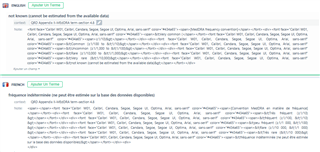
Screenshot of Trados Studio showing an error message 'XML tags cannot be extracted from the available data' above a text box filled with HTML code instead of plain text.

Thanks for your help


Generated Image Alt-Text
[edited by: Trados AI at 2:03 PM (GMT 0) on 5 Mar 2024]
emoji
Parents Reply
  • My understanding of this is that you have simply copied the code and pasted it in.  As far as MultiTerm is concerned this is just text.  How should it know you actually don't want this?  At what point does code copied in automatically become something we should disallow?

    I think the solution here is that you copy the text you need after understanding exactly what you are copying from.  Perhaps you can share the file you copied, or at least a small sample file, and then we can try to suggest how you could have handled this?

    Paul Filkin | RWS

    Design your own training!
    You've done the courses and still need to go a little further, or still not clear? 
    Tell us what you need in our Community Solutions Hub

Children