 Translate


There was a glitch with MultiTerm, and now one term is not editable anymore:
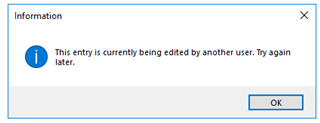
I am the only user.
Where is the lock information stored? How can I unlock the term?
Daniel
Generated Image Alt-Text
[edited by: Trados AI at 2:05 PM (GMT 0) on 5 Mar 2024]


There was a glitch with MultiTerm, and now one term is not editable anymore:
I am the only user.
Where is the lock information stored? How can I unlock the term?
Daniel
Daniel Hug
To unlock a term that remains locked even after closing Studio, there is 3 methods I know of:
1. Run the "Reorganize" under the Catalog View in Multiterm
* This does not work all the time, and I suggest you close Trados Studio when you do this
2. If you have Microsoft Access, open the Termbase and delete the content from the mtLocks table
* Make sure you backup your Termbase just in case
3. Export the Termbase and import it into a new empty Termbase.
Daniel Hug
To unlock a term that remains locked even after closing Studio, there is 3 methods I know of:
1. Run the "Reorganize" under the Catalog View in Multiterm
* This does not work all the time, and I suggest you close Trados Studio when you do this
2. If you have Microsoft Access, open the Termbase and delete the content from the mtLocks table
* Make sure you backup your Termbase just in case
3. Export the Termbase and import it into a new empty Termbase.

Thanks a lot! #2 solved the problem. Yes, I had thought of solution #3, but I was shying away from it.
Daniel

This problem has existed for years. Just installed Studio 2021 Freelance and was sad to see that the problem persists (except in GroupShare).
#1 does not do the trick
#2 would mean that I need to buy Access to manage by MultiTerm!
#3 is no option, because you'd have to do this again and again
Is a solution to this issue on the to-do list?
Varpu
