 Translate


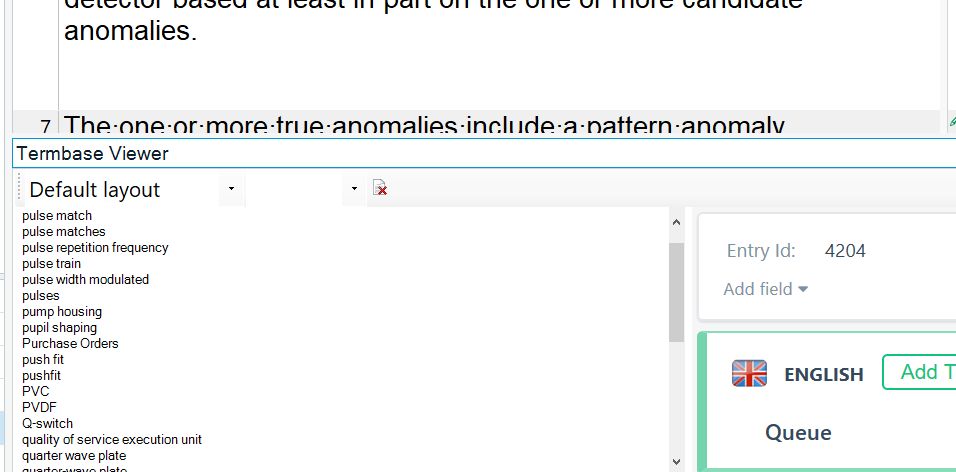
Any idea to solve this issue. Only happens here.
I am using a surface laptop 13.5 inches (2256 x 1504} screen
Generated Image Alt-Text
[edited by: RWS Community AI at 6:56 PM (GMT 0) on 14 Nov 2024]


Any idea to solve this issue. Only happens here.
I am using a surface laptop 13.5 inches (2256 x 1504} screen


Hi everyone,
I am creating a termbase from scratch for the first time – till now, I added terms within a Studio project using Quick Add Term.
Unfortunately, as reported here, the software is hardly usable on a modern display (4K or FullHD). The term list is absolutely unreadable. Resizing, resetting… makes no difference, see animated GIF below.
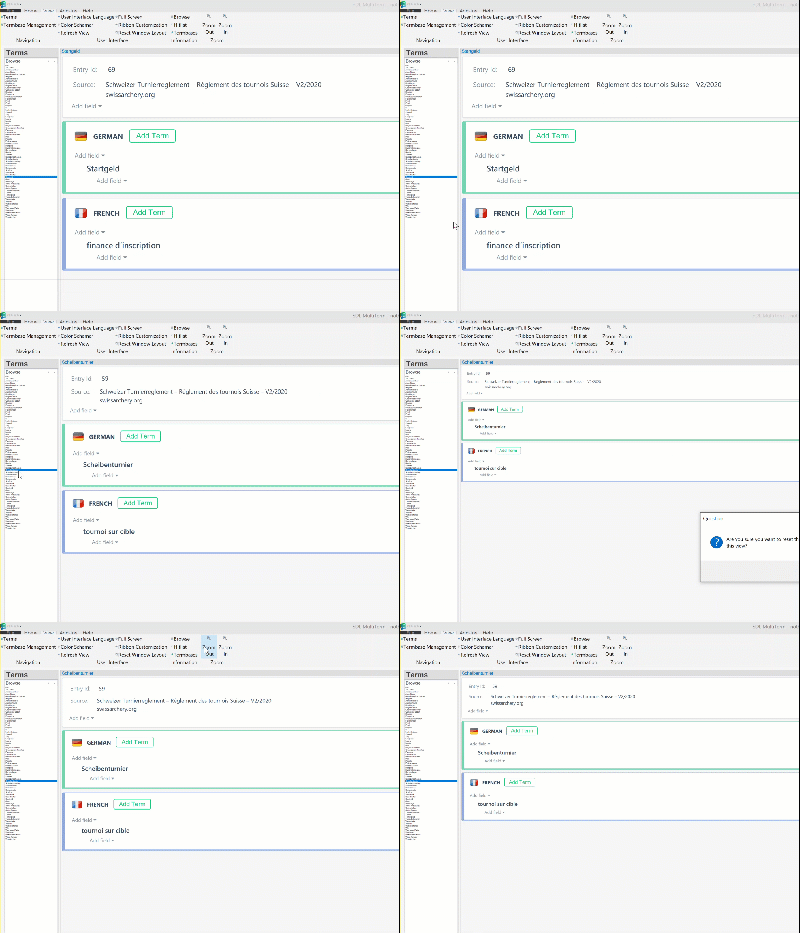
Philippe

This issue ought to be fixed by now as modern laptop are more and more getting away from 16:9 ratio. (16:10 or 3:2) with higher resolution than full HD.

Hi Paul,
I don’t think so. I tried on two different 2019/2020 laptops (13" and 15"). That tiny font in the Browse tab never changes. Note: the font in the Hitlist tab *does* change, I am only complaining about the Browse list. Tried on the latest Multiterm 2021 SR1 version.
Hi Philippe. Frankly, I don't believe, devs will fix this. I had similar problem - and look, nobody from devs answered this. We paid for this sotware quit big price, but as you see it's not important.
Hi Kamil,
I saw your – unanswered – latest post. It motivated me to post my own. 
IMHO this makes Multiterm virtually unusable on modern laptops. Next time I will build my TB in Excel instead of killing my eyes.

Kamil Gałczyński Philippe Noth
Frankly, I don't believe, devs will fix this.
In all honesty I believe you are right. I very much doubt this will ever get fixed for MultiTerm. It is possible that once we have successfully detached MultiTerm from Studio so that it is no longer so dependent on one solution that we can start to look at creating better solutions for the desktop tool and with that an independent preview that has proper functionality around font sizes in the preview window.
The focus on terminology is very much around the use of Language Cloud Terminology where the capability is actively developed, but there are still some dependencies in Studio that need to be addressed to allow us to make sure we have a better experience. Once this is done, and it is not a trivial task as the terminology features in Studio are very heavily wedded to MultiTerm, then we can improve it.
I'm pretty sure you won't be happy about this, but I either tell you where we are, lie, or just ignore you. I'd prefer to tell you where we are.
Next time I will build my TB in Excel instead of killing my eyes.
For many translators who only use a glossary this may be a better solution anyway as you can use the Excel Terminology Provider in Studio to use the excel file as a termbase and the preview is probably easier to read. If it's not we could probably do something about this and I'd be happy to initiate this work if you think it's needed and will help?
Paul Filkin | RWS
Design your own training!
You've done the courses and still need to go a little further, or still not clear?
Tell us what you need in our Community Solutions Hub
OK, the ex-computer geek in me found a solution, I believe. 
(Windows only)
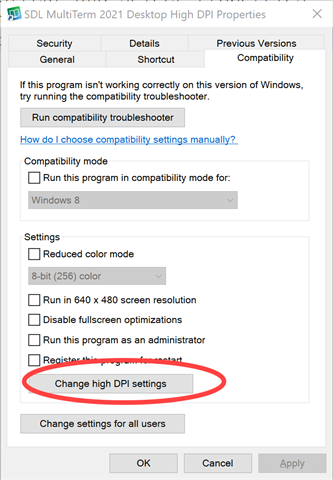
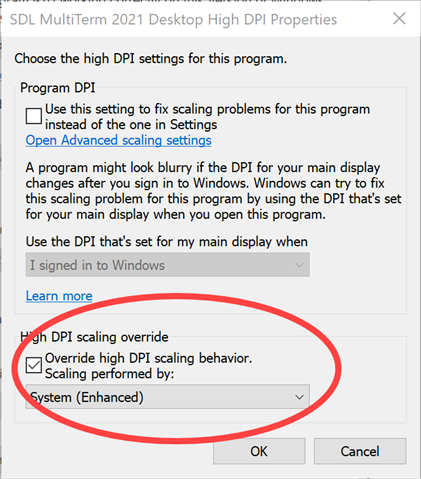
Result:
| before | after |
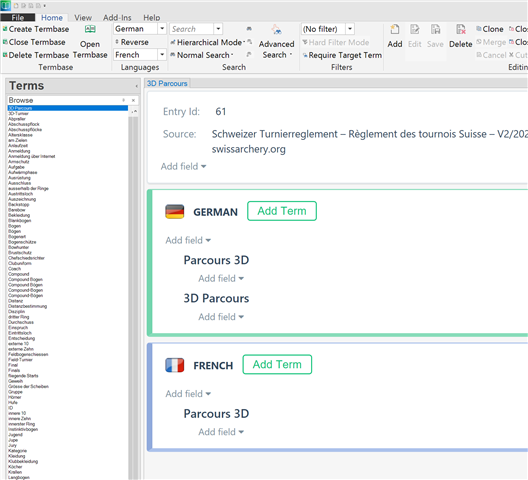 |
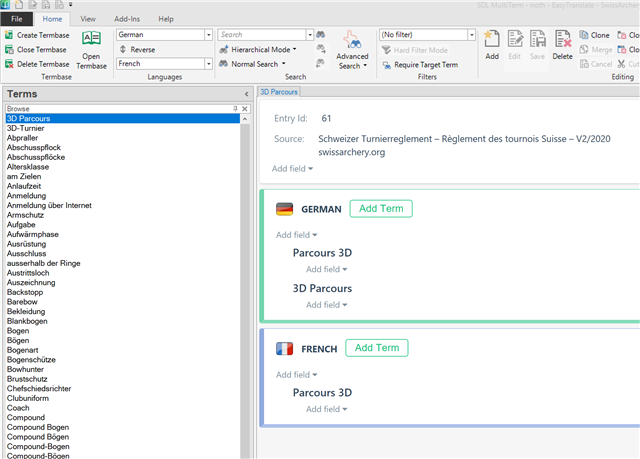 |

OK, the ex-computer geek in me found a solution, I believe.
(Windows only)
Result:
| before | after |
|
|
Thanks a lot!!!
Sorry, it does not work for me on my surface laptop 2 .
I tried both System (Enhanced) and the other value System
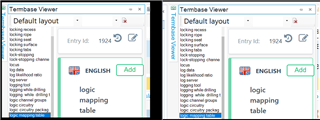
Left is with Override High DPI scaling behavior / System (Enhanced)
Right is with no Override High DPI scaling behavior
I have to take that back and I must say that the changes were applied in Multiterm only and the screen shot above were taken on Studio (no changes applied on Studio).
It does work on Multiterm with Override High DPI scaling behavior / System (Enhanced) in stand alone . I agree.
But when you have Studio with Override High DPI scaling behavior / System (Enhanced), Studio looks very bad as everything else is inflated.
It actually help you if you work only on Multiterm, which I do not use and therefore Studio still needs more work.
Paul Patruno I see what you mean, in Studio. I am not using this panel myself when translating. On a 3840x2160 (4K) laptop scaled at 200 %, I estimate the font size to be even less than 7-8, maybe 5-6, totally unreadable. There may be more chances for a fix in Studio than Multiterm, the user base is way larger.
I am hopeful it will be fixed in Studio soon now, 2 years after I noted and published about this problem.
Fortunately it does not bother me too much as I am using an external monitor in my office, which does not suffer from this problem, but every time I travel (which was obviously rare in he last 12 months) I am in trouble.

"Overriding the High DPI scaling behavior" worked for me!
Thanks.
Any update on this issue? None of these options worked for me. I am using Multiterm 2024 and Windows 10.
Hi Philippe...
I am impressed.
This stupid issue has been bugging me for the last two years since I started having to use Trados for some jobs. Normally I use Transit NXT, which is far superior in every way, including setting fonts. What's really worrying is that nobody at SDL in the last x years has apparently even tried to improve the situation. Today we all use high-resolutions screens and you can change fonts in all the panes, from what I can see, except this Termbase Viewer list.
Anyway, my problem solved and many thanks again!
Cheers from Germany
Alan