 Translate


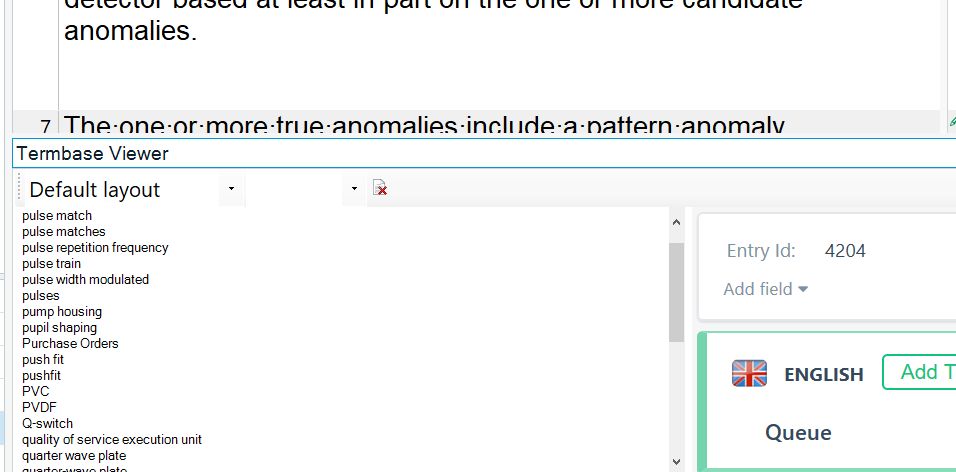
Any idea to solve this issue. Only happens here.
I am using a surface laptop 13.5 inches (2256 x 1504} screen
Generated Image Alt-Text
[edited by: RWS Community AI at 6:56 PM (GMT 0) on 14 Nov 2024]


Any idea to solve this issue. Only happens here.
I am using a surface laptop 13.5 inches (2256 x 1504} screen


Great Alison,
"place your cursor where you want to de/increase the size of the text [in the right hand pane of the termbase viewer] then Hit Ctrl+/Ctrl-" worked for me! Thank you!
However, I do not get the right font sizes back. Either too big or too small. SDL, please fix this!
I do not get the right font sizes back
Do you mean the fonts in the Studio Editor screen? If so, here's where you can limit the display font size to a minimum and a maximum size via File>Options: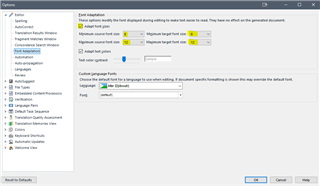
If not, please explain which fonts you're referring to.
Thanks!
Ali 
So, I explain it clearly: 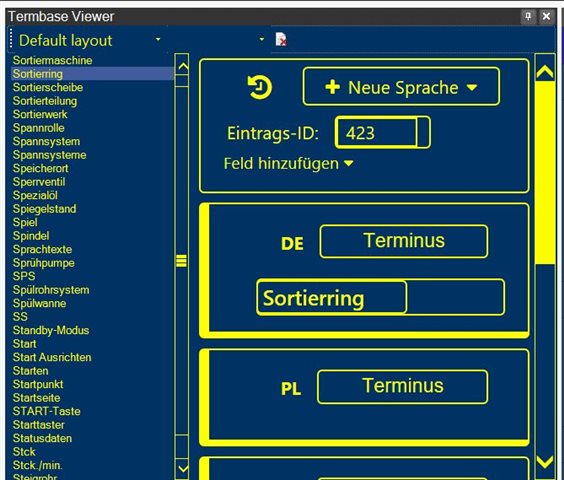
I won't increase my Windows settings font, because they are set on 150% and this is maximum, which can be set to make work possible on this <CENS> Windows 10. And trick with CTRL+/- doesn't work, because this simply insert tags into text, and not increase font size on this pane. So I ask kindly (but I'm really angry in fact), how can I make this fonts bigger? Why there's no optyion to set it bigger without such tricks?

So, I explain it clearly:
I won't increase my Windows settings font, because they are set on 150% and this is maximum, which can be set to make work possible on this <CENS> Windows 10. And trick with CTRL+/- doesn't work, because this simply insert tags into text, and not increase font size on this pane. So I ask kindly (but I'm really angry in fact), how can I make this fonts bigger? Why there's no optyion to set it bigger without such tricks?