SDL Language Cloud does not work after upgrading to Win 10 .

After upgrading to Win 10 I loaded my TM and SDL Language Cloud and then I got the message, "No Open TM's or  Automated Translation Servers."  According to All Language Pairs - TM and Automated Translation both are ticked but SDL Language Cloud does not present any results. I'm running Studio 2014.

Parents
  • Hi Ulla,

    You can try to activate the Language Cloud provider. It happens that even if you have it added as a TM provider in Settings, the connection is not made to the servers. Especially if you upgraded to Win 10, the settings files that store the log-in details might have changed.

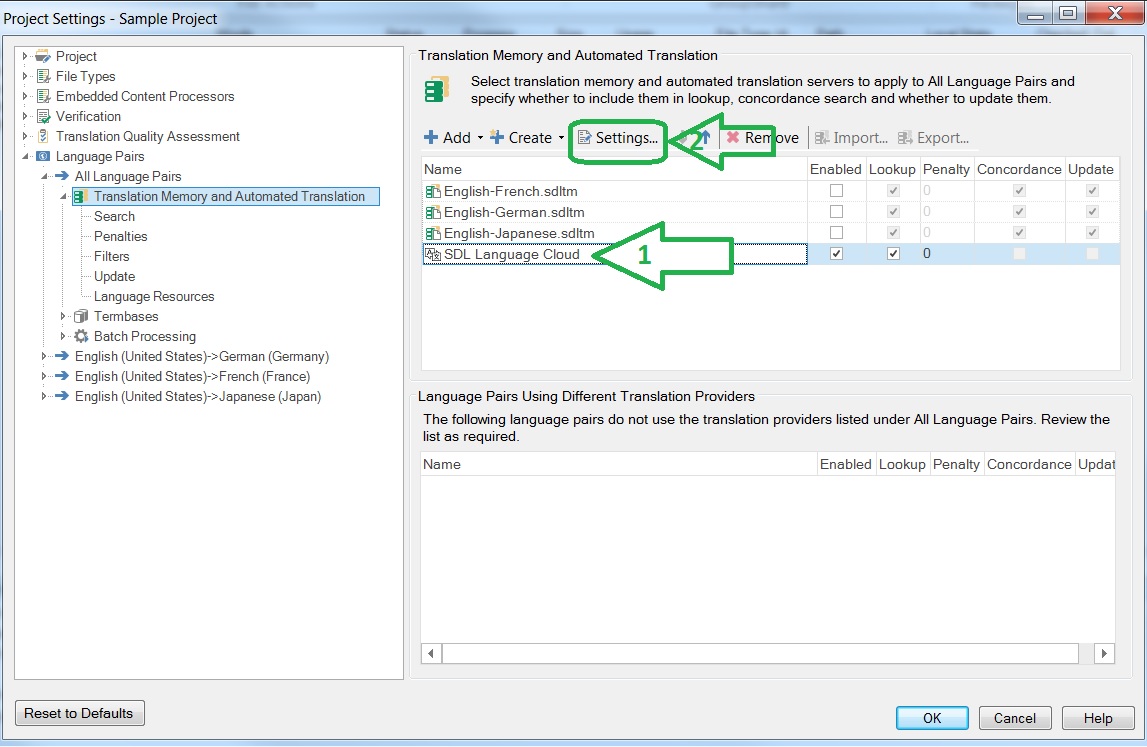
    In an open project try to go to Project Settings-> Select Language Cloud-> select Settings -> Go through the Engine selection window and dictionary selection and click finish.

    Check if LC is applies now. 

    Let us know if this worked.

Reply
  • Hi Ulla,

    You can try to activate the Language Cloud provider. It happens that even if you have it added as a TM provider in Settings, the connection is not made to the servers. Especially if you upgraded to Win 10, the settings files that store the log-in details might have changed.

    In an open project try to go to Project Settings-> Select Language Cloud-> select Settings -> Go through the Engine selection window and dictionary selection and click finish.

    Check if LC is applies now. 

    Let us know if this worked.

Children
No Data