Trados studio 2022 Cloud engine not found

Just upgrade from Trados Studio 2019 to Trados studio 2022. Now I get the error when I start new project "An error has occurred while using the translation provider Machine Translation: Cloud engine not found", and I cannot use machine translation. How can I fix this issue?

emoji
Parents
  • Hi  ,

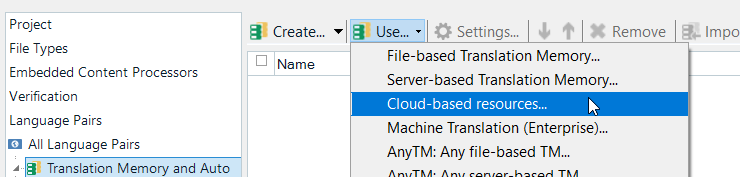
    Please check if you're logged in at the top right corner in Studio. Next, remove the cloud engine - this is an old one - and add it again from the drop down in Translation memory and settings:

    Trados Studio dropdown menu showing 'Cloud-based resources' option highlighted for selection.

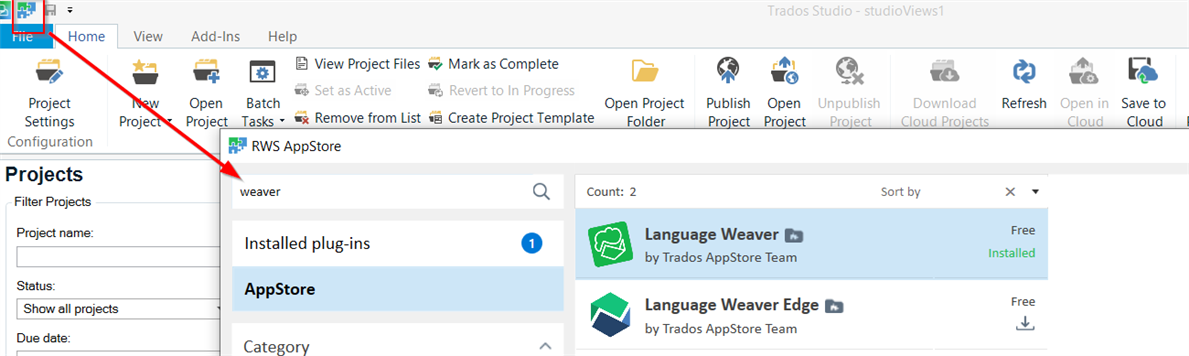
    As an alternative, you can also use Langauge Weaver provider - same as cloud resources - but it's a plugin that you can download directly from the integrated appstore from the top left corner in Studio:

    Trados Studio AppStore window with 'Language Weaver' and 'Language Weaver Edge' plugins listed as installed.

    I hope it helps!

    Oana

    Oana Nagy | QA Engineer | RWS Group

    emoji


    Generated Image Alt-Text
    [edited by: Trados AI at 6:17 AM (GMT 0) on 5 Mar 2024]
Reply
  • Hi  ,

    Please check if you're logged in at the top right corner in Studio. Next, remove the cloud engine - this is an old one - and add it again from the drop down in Translation memory and settings:

    Trados Studio dropdown menu showing 'Cloud-based resources' option highlighted for selection.

    As an alternative, you can also use Langauge Weaver provider - same as cloud resources - but it's a plugin that you can download directly from the integrated appstore from the top left corner in Studio:

    Trados Studio AppStore window with 'Language Weaver' and 'Language Weaver Edge' plugins listed as installed.

    I hope it helps!

    Oana

    Oana Nagy | QA Engineer | RWS Group

    emoji


    Generated Image Alt-Text
    [edited by: Trados AI at 6:17 AM (GMT 0) on 5 Mar 2024]
Children
No Data