Too slow ?

In general, I like "Language Weaver" when I handle it at FileLevel

But

It took me "5"minutes to make (only) "1,000"segments when I handle it at ProjectLevel

It means, I have to spend several hours when I have lots of files to make "Project"s

Is there any good way to reduce that time ?

Am I select a correct path ?
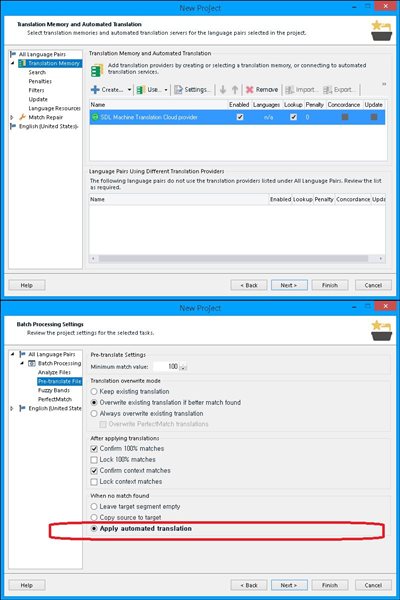
Trados Studio New Project window showing Translation Memory and Automated Translation settings with Language Weaver selected as the machine translation cloud provider.

Thanks..


Generated Image Alt-Text
[edited by: Trados AI at 6:04 AM (GMT 0) on 5 Mar 2024]

emoji
Parents
  • Hi 

    I am running a test on a large file to see what I get. However I do feel its all subjective as you may have 10000 segments but remember NMT works on a per word basis. So these 1000 segments could yield a significant number of words in total.

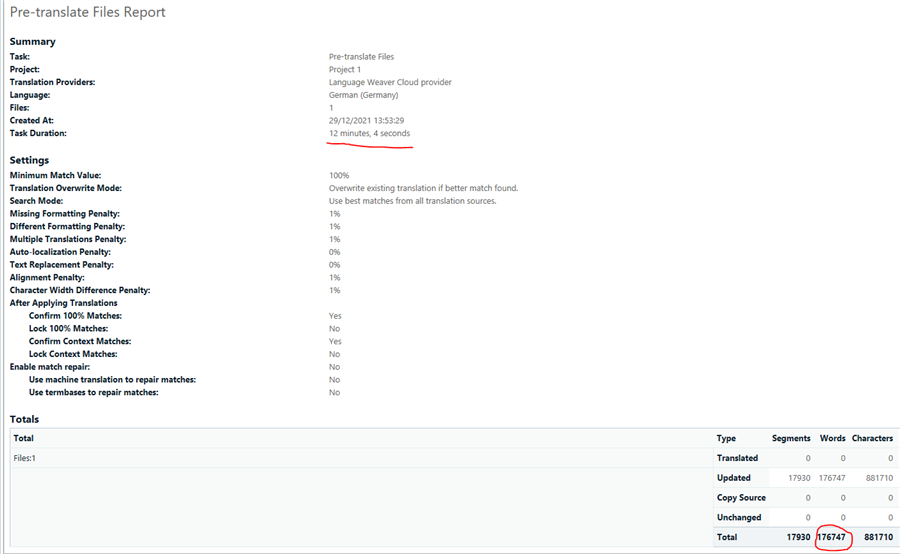
    In my case I have 176747 word which took over 12 minutes to process. I think this equates to 245 words pre translated with NMT per minute which I think despite the 12 minutes is fair.

    Trados Studio Pre-translate Files Report showing task details, settings, and totals. Task duration is 12 minutes, 4 seconds. 176747 words updated.

    What does your pre-translate analysis report show as it gives the time as well as segment/word breakdown?

    I also noted that your app is out of date is its now simply called Language Weaver Cloud. Not that I think it matters but simply to let you know that depending on your Trados Version there maybe a newer app available for you. 

    Lyds

    Oana Nagy | QA Engineer | RWS Group

    emoji


    Generated Image Alt-Text
    [edited by: Trados AI at 6:04 AM (GMT 0) on 5 Mar 2024]
  • so, your reply means that there is no other way to use SegmentLevel of NMT. Right ?

    emoji
  • , Im not entirely sure I understand what you mean. You work with NMT in several ways:

    1. Within Studio in the following ways:
    1.a Within the Editor view, on a per segment basis when active in the editor view. At this point entire sentences and individual words are presented (if using uplift).
    1.b Project level as you mentioned above

    2. Or directly via https://translate.sdl.com
    Where you can drag drop / past content for pure NMT

    However I circle back round to a previous update I made where if you take your pre-translate analysis report using your 1000 segments and break it down to the number of words over the time it takes, it does help put perspective over the time it takes to pre-translate. 

    Lyds 

    Oana Nagy | QA Engineer | RWS Group

    emoji
Reply
  • , Im not entirely sure I understand what you mean. You work with NMT in several ways:

    1. Within Studio in the following ways:
    1.a Within the Editor view, on a per segment basis when active in the editor view. At this point entire sentences and individual words are presented (if using uplift).
    1.b Project level as you mentioned above

    2. Or directly via https://translate.sdl.com
    Where you can drag drop / past content for pure NMT

    However I circle back round to a previous update I made where if you take your pre-translate analysis report using your 1000 segments and break it down to the number of words over the time it takes, it does help put perspective over the time it takes to pre-translate. 

    Lyds 

    Oana Nagy | QA Engineer | RWS Group

    emoji
Children