
Language Cloud not working - allowed character limit reached

Hi
I've just logged on for the first time this year and my SDL Language Cloud is not working.

There is an error message to say I have reached my character limit but checking on line I have only ever used 471,000 characters since I purchased Trados.

Plus there seems to be no option to choose the Language Cloud in the system:
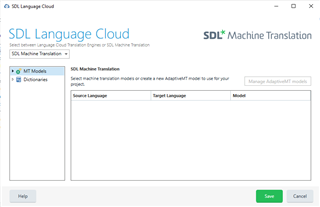
Screenshot of SDL Language Cloud window showing Machine Translation tab with empty Source Language, Target Language, and Model fields.

I've tried a fresh start but no avail. Any ideas?

Thanks

Ian


Generated Image Alt-Text
[edited by: Trados AI at 5:52 AM (GMT 0) on 5 Mar 2024]

emoji
Parents
  • I have a similar problem. I have just passed from 2019 to 2021 version and I can't use the Language Cloud automated translation. I have not used it yet, since I upgraded the version, and in the past I had all the free characters available. In addition, when I open settings, the TM / Language Cloud options can never be selected. Even if I select it, when I exit and re-enter the Settings page, the white boxes are unchecked (they uncheck by themselves). And when I ask for pretranslation, nothing happens. What should I do?

Reply
  • I have a similar problem. I have just passed from 2019 to 2021 version and I can't use the Language Cloud automated translation. I have not used it yet, since I upgraded the version, and in the past I had all the free characters available. In addition, when I open settings, the TM / Language Cloud options can never be selected. Even if I select it, when I exit and re-enter the Settings page, the white boxes are unchecked (they uncheck by themselves). And when I ask for pretranslation, nothing happens. What should I do?

Children