Issue with SDL Language Cloud in Trados Studio 2019

Hi

I have an issue with SDL Language Cloud in Trados Studio 2019, as it is empty. 

(My version of Trados Studio is 15.2.7.2849) Please see the below screen-dump:
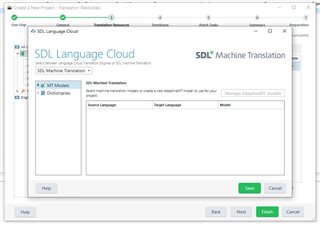
Screenshot of Trados Studio 2019 showing an empty SDL Language Cloud window with tabs for MT Models and Dictionaries, and a message 'Install machine translation models or create a new Machine Translation model for your pair.'

I have tried to uninstall the previous version and to reinstall an updated version, but unfortunately, the issue is not resolved.

I hope that you can help me.

Best regards

Susan Murphy Lamprecht


Generated Image Alt-Text
[edited by: Trados AI at 5:47 AM (GMT 0) on 5 Mar 2024]

emoji
Parents Reply Children
  • Hi Steven Whale

    I have just checked the above-mentioned folders and can see that the app has been correctly installed. 

    (I have also installed the app SDL Machine Translation Edge for Trados Studio 2019).

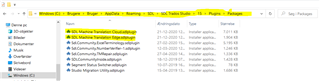
    Below please find a screen dump from the File Explorer on my desktop computer (Packages) with yellow markings:

    Screenshot of File Explorer showing Trados Studio 'Packages' folder with items 'SDL Machine Translation Edge' highlighted in yellow.

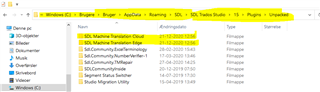
    Below please find a similar screen dump from the File Explorer on my desktop computer (Unpacked) with yellow markings:

    Screenshot of File Explorer showing Trados Studio 'Unpacked' folder with items 'SDL Machine Translation Cloud' and 'SDL Machine Translation Edge' highlighted in yellow.

    Best regards

    Susan Murphy Lamprecht

    emoji


    Generated Image Alt-Text
    [edited by: Trados AI at 5:47 AM (GMT 0) on 5 Mar 2024]