Unable to access Language Cloud from Studio 2019

Since Sunday 15th I have been unable to access my SDL Language Cloud account from within Studio 2019. When I try to log in, in the sign-on dialog box that normally disappears on successful login, I am shown what looks like the front page of the SDL website. This is happening on both my main PC and laptop, hence probably not to do with the systems themselves. I can access machine translation through Word so there is nothing wrong with my Language CLoud account.

What is going on please??? 

Geoff Williams

GW Specialized Translations

Parents
  • Hello ,

    Could you please post some screen images of what you are seeing please as i'm unable to replicate this in various browsers and this problem hasn't been reported elsewhere as far as i'm aware.

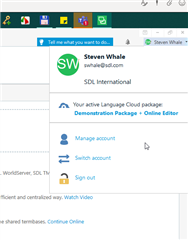
    Screenshot of Trados Studio showing user Steven Whale's active account with options to manage account, switch account, or sign out.

    The most likely cause is that your browser is 'remembering' an old log in for some reason.

    Clearing your browser cache often resolves this.

    Oana Nagy | QA Engineer | RWS Group

    emoji


    Generated Image Alt-Text
    [edited by: Trados AI at 5:20 AM (GMT 0) on 5 Mar 2024]
  • Hello Steven

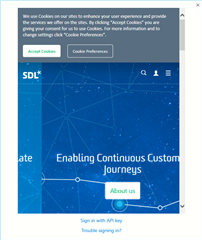
    See image below from the login dialog in Studio. When I try to log in through a browser it just shows a blank page.

    I have recently changed my login ID to a new email address but it worked for a couple of weeks after that so I would be surprised if that was the problem.

    I cleared out my cache as you suggested but the problem is still there. In any case I can't see how that would fix the problem within Studio 2019, or am I missing something?

    Best wishes

    GeoffScreenshot of Trados Studio login dialog with a browser error displaying a blank page and a cookie consent banner overlay.

    emoji


    Generated Image Alt-Text
    [edited by: Trados AI at 5:21 AM (GMT 0) on 5 Mar 2024]
  • Hello ,

    If your browser is remembering old log in details- this will also affect when you log into LC via Studio.

    The email address which is valid on your account is-

    ######@s#########-##ns.......

    Please allow cookies and try again- maybe try a different browser as well.

    I would recommend Chrome or FireFox- but to avoid MS Edge or Internet Explorer.

    Oana Nagy | QA Engineer | RWS Group

  • Thanks again for these tips. Have done all that, specifically removed all cookies related to SDL Language Cloud and tried again, tried logging in through Firefox which was freshly installed. Still not working.

    In the browser I get to a page that asks me to accept terms and conditions, and once clicked on the appropriate boxes it goes to a page with an address: https://languagecloud.sdl.com/lc/auth0/login-silent which alternates with .../callback=?code... followed by a complicated long character string. 

    Are you sure you are correct that the browser settings affect the login via Studio? I saw in another thread that whatever is stored by the browser does not affect Studio (otherwise you would not have to constantly re-login to SDL account every time you restart Studio).

    I have put in a support request through the support Gateway.

    best regards

    Geoff 

Reply
  • Thanks again for these tips. Have done all that, specifically removed all cookies related to SDL Language Cloud and tried again, tried logging in through Firefox which was freshly installed. Still not working.

    In the browser I get to a page that asks me to accept terms and conditions, and once clicked on the appropriate boxes it goes to a page with an address: https://languagecloud.sdl.com/lc/auth0/login-silent which alternates with .../callback=?code... followed by a complicated long character string. 

    Are you sure you are correct that the browser settings affect the login via Studio? I saw in another thread that whatever is stored by the browser does not affect Studio (otherwise you would not have to constantly re-login to SDL account every time you restart Studio).

    I have put in a support request through the support Gateway.

    best regards

    Geoff 

Children
No Data