Have to sign in with SDL ID every time I open SDL Trados Studio 2019 Freelance

Every time I close SDL Trados Studio 2019, I am also signed out of Language Could (SDL ID and password). I have to sign in again with both userid and password. Previously, this information was stored, and I didn't have to do this, I was automatically signed in with my SDL ID and password when I opened the program. It is irritating having to retrieve the password again every time. Is there any way of saving the SDL ID and password?

  • Hello ,

    Studio doesn't actually save any of your passwords- this is done via your browser.

    Normally when you log into a site (for the first time) that requires a 'login' your browser will ask you whether you want to save the password or not- and gives you two options- Never and Yes.

    Its possible that you may have inadvertently changed the settings or answer NO to the password save option.

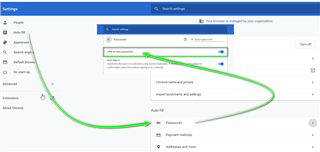
    Please check your browser settings- (example here from Chrome)

    Screenshot of Chrome browser settings showing Autofill section with Passwords highlighted and an arrow pointing to the 'Add' button.

    You may need to clear you cookies and browser cache in order to get Autofill to work again.

    Oana Nagy | QA Engineer | RWS Group

    emoji


    Generated Image Alt-Text
    [edited by: Trados AI at 5:19 AM (GMT 0) on 5 Mar 2024]
  • Hi Steven,

    Thanks for your reply, but I am not sure this is the problem, since it is quite random. In other words, sometimes when I open Studio, I am signed in, sometimes not, and sometimes my username is saved/displayed when I have to sign in, and sometimes not. However, I use a password manager for browser passwords - I will check whether being signed into it means the problem does not occur.

    Best regards,

  • Hi again Steven,

    I have now checked whether being logged in to SDL in a browser makes any difference - it doesn't. Previously, Studio did save the log-in.

    Best regards,

    Katherine

  • Hello ,

    Studio does not save your passwords.

    These are saved in your Browser e.g. (Chrome/Firefox)- but then encrypted and stored in a safe folder.

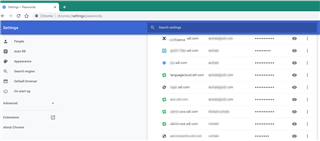
    From this example you can see my Language Cloud and Account passwords are all stored in Chrome***.

    Screenshot of Chrome browser settings showing saved passwords for various accounts including Language Cloud and Account passwords.

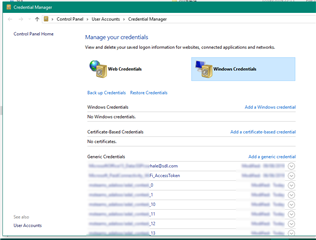
    An exception to this, will be possibly if you are using Edge or IE (which I personally wouldn't be recommending) and then the passwords are stored in the Windows Credentials Manager

    Screenshot of Windows Credential Manager displaying stored credentials for web and Windows accounts.

    If you have cleared your cache and cookies and are still experiencing issues, then it is likely there is a conflict between the default browser programmed in Windows 10 (this is not the same as the default browser you choose to run when you use the web.

    By conflict I mean that the login details are stored both in the WCM and the browser possibly.

    Oana Nagy | QA Engineer | RWS Group

    emoji


    Generated Image Alt-Text
    [edited by: Trados AI at 5:20 AM (GMT 0) on 5 Mar 2024]