
SDL Language cloud MT

It was working when I imported my document and started translating. I had done about 200 segments when I noticed that the Save Target As option wasn't working so I deleted the whole thing and started all over. After having filled in all the previous 200 translation results I wanted to continue and - no MT results! I get this error message:
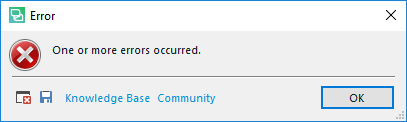
Error dialog box in Trados Studio with a red cross symbol and the message 'One or more errors occurred.' with options for Knowledge Base and Community.

During my first translation run the MT had been working properly. I use the basic MT that is free. What about the MT with AdaptiveMT Technology that supposedly comes automatically with Studio 2017 and 2019? I'm running Studio 2019 Freelance Pro and Windows 10 Pro. 


Generated Image Alt-Text
[edited by: Trados AI at 5:17 AM (GMT 0) on 5 Mar 2024]

emoji
Parents
  • Hi

    Try removing the MT provider from yourproject, then close Studio.  Now restart Studio and add the MT provider back into your project.  Does that help?

    It might be interesting to see the error stack itself and not just a screenshot of the error.  If you click on the little disk symbol in that error message (next to where it says "knowledge base") you can save the error stack as an xml file to your desktop.  Then just attach the xml to your post and the forum will render the xml in an easy way to read it.

    Paul Filkin | RWS

    Design your own training!
    You've done the courses and still need to go a little further, or still not clear? 
    Tell us what you need in our Community Solutions Hub

Reply
  • Hi

    Try removing the MT provider from yourproject, then close Studio.  Now restart Studio and add the MT provider back into your project.  Does that help?

    It might be interesting to see the error stack itself and not just a screenshot of the error.  If you click on the little disk symbol in that error message (next to where it says "knowledge base") you can save the error stack as an xml file to your desktop.  Then just attach the xml to your post and the forum will render the xml in an easy way to read it.

    Paul Filkin | RWS

    Design your own training!
    You've done the courses and still need to go a little further, or still not clear? 
    Tell us what you need in our Community Solutions Hub

Children
No Data