 Translate


Hello,
I just created a termbase in the SDL Language cloud and I would like to use it with my desktop trados studio Freelance 2017.
Is this possible or I have to buy Studio 2019?
Thank you for your help
Best regards
Suzanne Chabot

Hello,
I just created a termbase in the SDL Language cloud and I would like to use it with my desktop trados studio Freelance 2017.
Is this possible or I have to buy Studio 2019?
Thank you for your help
Best regards
Suzanne Chabot

Hello Suzanne,
In 2017 LC Terminology Beta has been removed and it is only available in Trados 2019. You can find this in the release notes Cumulative Updates for SDL Trados Studio 2017 SR1
SDL Trados Studio Application
https://gateway.rws.com/csm?id=kb_article_view&sysparm_article=KB0027380
Let me know if this answers your questions.
Regards,
Radu

Is there any other way I can use my cloud Termbase? Is there an extension, for example, an application, a server, etc?
Hi Suzanne,
Just realized that Trados 2017 still has the Dictionary function.
So a Termbase you have in your Language Cloud account can be used as a Dictionary when applying MT.
This means that in the Termbase you have a specific term it should be used in the Machine Translation output.
You can find the Dictionary option in the SDL Language Cloud Settings menu. See screenshot.
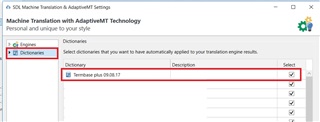

Hello Radu,
This is good news!
I do not want to abuse your time, but if you are able to, can you show me how to do that, please.
I do not understand the screenshot.
Thank you so much
Suzanne
Hello Radu,
This is good news!
I do not want to abuse your time, but if you are able to, can you show me how to do that, please.
I do not understand the screenshot.
Thank you so much
Suzanne
Do I need to activate the SDL Language Cloud machine translation also?
The problem is that I do not want any machine translation. Especially form SDL.
It is very bad from Arabic into French, I tried before.
I just want to use my own terminology database.
Also, when I tried the machine translation, I notice that SDL charged me a certain amount of money on my bank account, while it is supposed to be free up to a certain number of words. I do not understand that. But It makes me afraid to try it again.
Hi Suzanne,
The dictionary function only works with Machine Translation from Language Cloud, it applies your termbase on the Machine Translation result to improve it.
So if you do not want to use Language Cloud Machine Translation the only solution is to upgrade to 2019 where you can use only LC Terminology.
Language Cloud Machine Translation is free up to 200.000 characters, you only paid for it if you activated yourself a paid subscription and added a credit card to your account. We do not charge customers without them activating a paid subscription and adding their credit card to the LC Account. The Free subscription works for everyone that has a Trados Studio license.
Hope this helps.
Regards,
Radu
Hello Radu,
Thank you very much for your answer.
I contacted SDL and they refunded me everything. I am sorry that we cannot use the cloud dictionary into SDL Trados Studio 2017 like before (with the beta version). This problem made me lose a lot of time.
Best regards,
Suzanne