
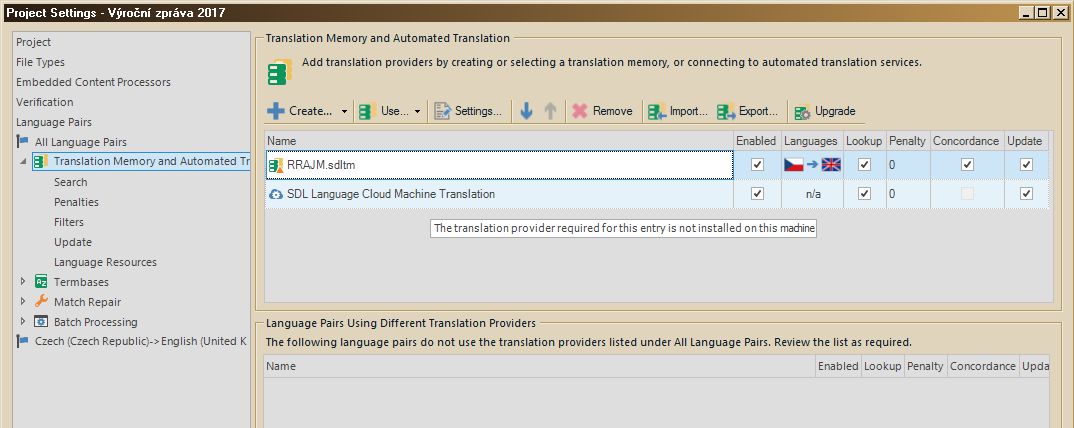
The translation provider required for this entry is not installed on this machine.

Trados Studio error message stating 'Authentication problem in creating or updating a translation memory or connecting to a translation provider.'

I am new to cloud services. I logged on to my account, created a new project, in its settings I added a local translation memory and the SDL language cloud machine translation and started translating - it worked. After exiting SDL and reopening, the cloud MT stopped working and I am getting the above message (see screenshot). I tried to remove this item and add it again, reopen SDL, remove even the local memory to start from scratch, but nothing helped. Any idea before I start hating SDL for wasting so much of my time instead of saving it?

Thanks


Generated Image Alt-Text
[edited by: Trados AI at 5:08 AM (GMT 0) on 5 Mar 2024]

emoji
  • Hi ,

    The message you are seeing is a tooltip bug and not a functional problem. Just for reference for anyone else seeing this too, the bug number for this is CRQ-8202... it's easier to get an update on these things if you know the number to quote.

    Can you provide a screenshot of what you are seeing in the Editor just in case you are loking at the wrong view in error? Can you also check if the “Look up segments in MT even if a TM match has been found” option is enabled?

    Regards

    Paul

    Paul Filkin | RWS

    Design your own training!
    You've done the courses and still need to go a little further, or still not clear? 
    Tell us what you need in our Community Solutions Hub