
To make [ExportForBilingualReview MS Word] file simpler

Former Member
Former Member

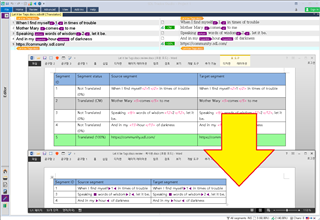
Screenshot of Trados Studio with a MS Word file selected for 'Export for Bilingual Review' showing segments with less than 100% match and tags converted to arrows in a three-column layout.


; You select a MS Word file (.docx)
; which has made from SDL Trados Studio for "Export for Bilingual Review" (Side by Side style Only)
; then, this Code shows only LessThan100% Segments, changes Tags into arrow and makes 3 columns
; You can not "Update from Bilingual Review" again for sure, I guess.
 it makes a  "_Simplified.docx" file as a result


Enjoy

export Bilingual MS Word_Review_Updated.zip


Generated Image Alt-Text
[edited by: Trados AI at 4:18 AM (GMT 0) on 5 Mar 2024]
emoji
Parents
  • Thanks for this script.  I'm not sure I see the value of this one other than to perhaps make it a review process similar to the one you'd see in Studio... which is interesting!  But without an import possible it may lose some value.  If you could figure out how to reverse that after the review and not break the import it would be pretty cool.

    Paul Filkin | RWS

    Design your own training!
    You've done the courses and still need to go a little further, or still not clear? 
    Tell us what you need in our Community Solutions Hub

Reply
  • Thanks for this script.  I'm not sure I see the value of this one other than to perhaps make it a review process similar to the one you'd see in Studio... which is interesting!  But without an import possible it may lose some value.  If you could figure out how to reverse that after the review and not break the import it would be pretty cool.

    Paul Filkin | RWS

    Design your own training!
    You've done the courses and still need to go a little further, or still not clear? 
    Tell us what you need in our Community Solutions Hub

Children