 Translate


Nach Hinzufügen einer neuen Datei zu einem cloud Projekt, kann ich diese nicht im Online Editor öffnen? Mir wird lediglich der Status in Bearbeitung angezeigt.
Was hat das zu bedeuten?


Nach Hinzufügen einer neuen Datei zu einem cloud Projekt, kann ich diese nicht im Online Editor öffnen? Mir wird lediglich der Status in Bearbeitung angezeigt.
Was hat das zu bedeuten?
Hi Alide Folz
Is the status still stuck In Progress?
If you look at your project in Language Cloud, at what stage is your new file stuck at?
Preprocessing? Or is it in a Translation Stage?
You may also find some helpful errors/warnings if you look under Task History
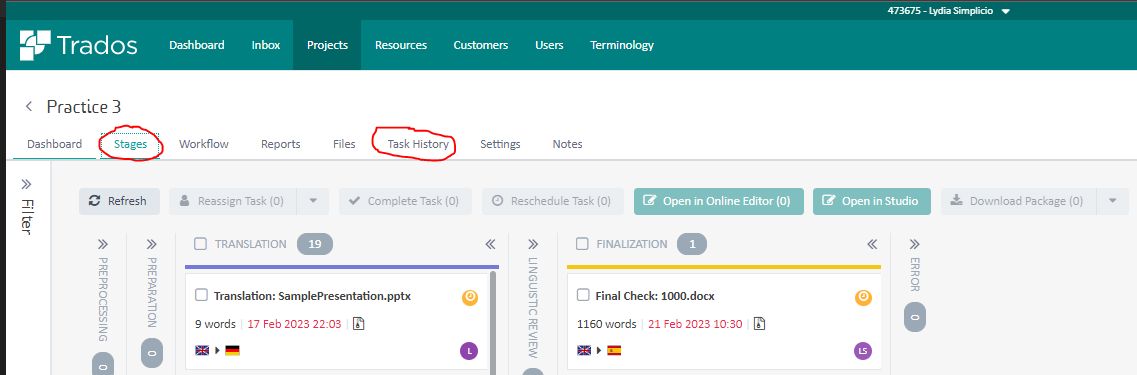
If there are Errors/Warnings under Task History, please can you share them so we can identify the root cause
Looking forward to your clarifications
Lyds
Oana Nagy | QA Engineer | RWS Group

Hi Alide Folz
Is the status still stuck In Progress?
If you look at your project in Language Cloud, at what stage is your new file stuck at?
Preprocessing? Or is it in a Translation Stage?
You may also find some helpful errors/warnings if you look under Task History
If there are Errors/Warnings under Task History, please can you share them so we can identify the root cause
Looking forward to your clarifications
Lyds
Oana Nagy | QA Engineer | RWS Group
