
Google Translate (v3) integration stopped working after v19.0.0.3043, how to fix?

So I was encouraged to upgrade my Freelance Trados install, but was not informed that it would break Google ML integration support.

Apparently we now have to install a separate plugin to get Google Cloud providers, so I did that and got the familiar dialogue but now when I try to load my JSON file from Google Cloud I get this:
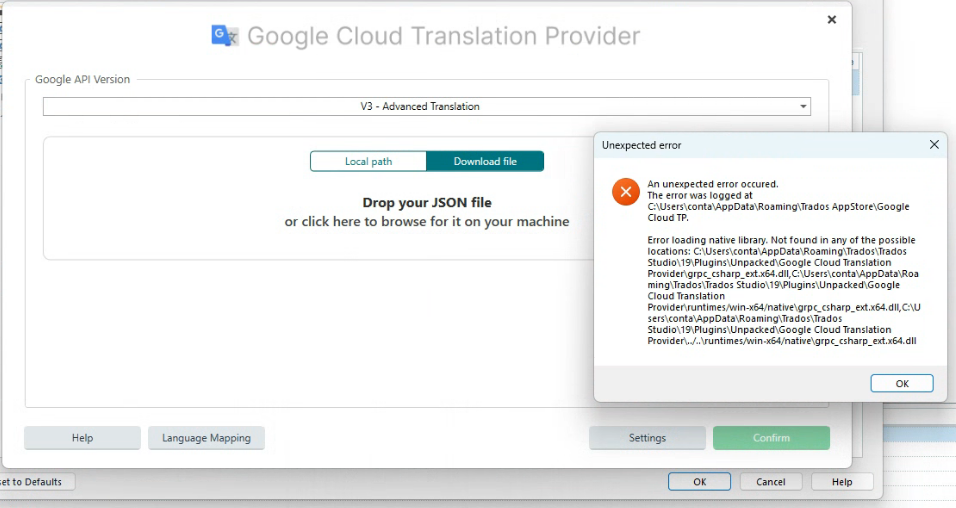
Google Cloud Translation Provider interface showing options to drop a JSON file or browse for it, with an error message stating 'An unexpected error occurred' and details about missing native libraries.

What "native library" is it referring to? This looks like a problem with Trados lacking some C-sharp library it needs.

The JSON file worked fine until now, but I generated a new one just in case, and got the same error.

When I OK this message box I get:
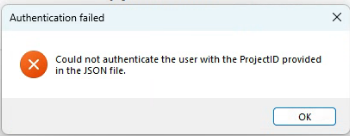
Error message titled 'Authentication failed' stating 'Could not authenticate the user with the ProjectID provided in the JSON file.'

I really don't know what that means, anyone help? I must reiterate that I had been using Google Translate Cloud translation for two years without incident until this update.

Mark


Removed AI Suggestion
[edited by: Mark Daniels at 2:41 PM (GMT 1) on 29 Jun 2026]

emoji
Parents
  • Hello Mark,

    Thank you for sharing the details of your issue. It seems that the integration of Google Cloud Translation API in Trados Studio has indeed changed, requiring the use of the MT Enhanced Plugin for Trados Studio. Let me guide you step-by-step to resolve the issue you're encountering:

    ### Step 1: Verify Plugin Installation

    Ensure that the **MT Enhanced Plugin for Trados Studio** is installed correctly. You can check this by:

    - Opening Trados Studio.

    - Navigating to the "Add-Ins" tab and selecting "RWS AppStore."

    - Searching for the "MT Enhanced Plugin for Trados Studio" and confirming that it is installed. If not, install it and restart Trados Studio.

    ### Step 2: Update the Plugin

    Ensure that you are using the latest version of the MT Enhanced Plugin. Updates often resolve compatibility issues. You can check for updates within the RWS AppStore in Trados Studio.

    ### Step 3: Verify Google Cloud JSON File

    - Confirm that the JSON file you are using is valid and corresponds to the correct Google Cloud project.

    - Ensure that the Google Cloud Translation API is enabled for your project in the Google Cloud Console.

    ### Step 4: Install Required

    emoji
  • This is outdated information, the MT Enhanced Plugin for Trados Studio is a legacy plugin and has not been relevant for some time.

    emoji
  • Hello,

    Thank you for pointing that out! You are absolutely correct that the MT Enhanced Plugin for Trados Studio is considered a legacy plugin and is no longer relevant, especially with the advancements in machine translation technology and the integration of more modern solutions like Language Weaver and the official DeepL Translation Provider plugin.

    To address the context provided, it's important to note that DeepL's discontinuation of support for outdated authentication methods has indeed impacted older versions of Trados Studio, such as Trados Studio 2021 and earlier. Users relying on these versions will need to upgrade to a more recent version of Trados Studio to continue using the official DeepL Translation Provider plugin seamlessly.

    For those still using older versions, here are some steps to consider:

    1. **Upgrade to the Latest Version of Trados Studio**: This ensures compatibility with the latest plugins and features, including the updated DeepL Translation Provider.

    2. **Install the Official DeepL Plugin**: Once upgraded, you can download and install the official DeepL Translation Provider plugin from the RWS AppStore.

    3. **Explore Language Weaver**: If you're looking for an alternative, Language Weaver is a robust and integrated machine translation solution available within the Trados ecosystem.

    4.

    emoji
Reply
  • Hello,

    Thank you for pointing that out! You are absolutely correct that the MT Enhanced Plugin for Trados Studio is considered a legacy plugin and is no longer relevant, especially with the advancements in machine translation technology and the integration of more modern solutions like Language Weaver and the official DeepL Translation Provider plugin.

    To address the context provided, it's important to note that DeepL's discontinuation of support for outdated authentication methods has indeed impacted older versions of Trados Studio, such as Trados Studio 2021 and earlier. Users relying on these versions will need to upgrade to a more recent version of Trados Studio to continue using the official DeepL Translation Provider plugin seamlessly.

    For those still using older versions, here are some steps to consider:

    1. **Upgrade to the Latest Version of Trados Studio**: This ensures compatibility with the latest plugins and features, including the updated DeepL Translation Provider.

    2. **Install the Official DeepL Plugin**: Once upgraded, you can download and install the official DeepL Translation Provider plugin from the RWS AppStore.

    3. **Explore Language Weaver**: If you're looking for an alternative, Language Weaver is a robust and integrated machine translation solution available within the Trados ecosystem.

    4.

    emoji
Children