Connection failed code -2146233088 (OpenAI provider for Trados Studio)

Dear all,

we deployed an Azure OpenAI model in our MS Azure infrastructure, according to our IT team it should be up and running.

When setting up the connection details in the Trados Studio plugin I get the following error message (see screenshot below).

It doesn't seem to be an API error (https://platform.openai.com/docs/guides/error-codes/api-errors).

The Studio log file does not give more details:

OpenAI.Provider.API.AIProvider: 2025-08-20 17:16:49.4640 Info Method: "TestConfiguration", Message: "Fehler beim Senden der Anforderung."
OpenAI.Provider.API.AIProvider: 2025-08-20 17:17:01.3201 Info Method: "TestConfiguration", Message: "Fehler beim Senden der Anforderung."

I'm using Trados Studio 2024 SR1. 

Any suggestions?

Regards,

Bruno
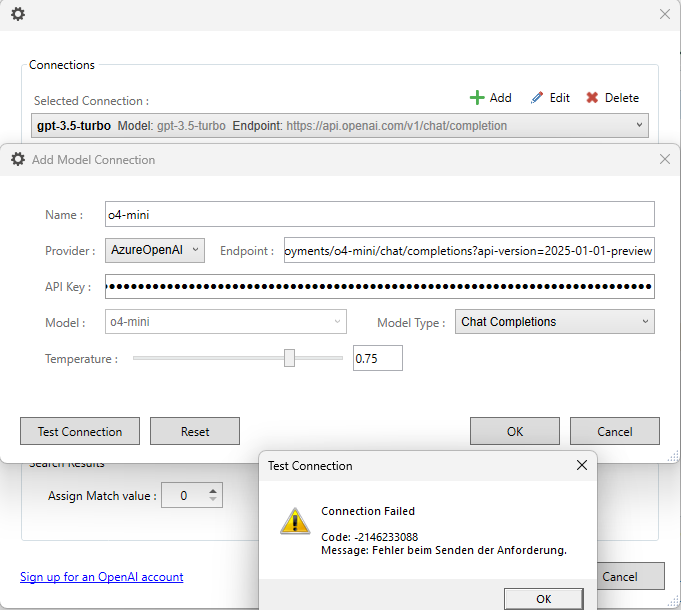
Screenshot showing the Trados Studio 'Connections' window with a selected connection named 'gpt-3.5-turbo' and its endpoint URL.


Generated Image Alt-Text
[edited by: RWS Community AI at 4:18 PM (GMT 1) on 20 Aug 2025]

emoji
Parents
  • Probability score: 0.6  

    Question improvement suggestion: Provide more details about the connection settings you are using and any specific configurations made in Azure.  

    In the meantime, based on the information you have provided, here is a suggested answer to your question:  

    Hello Bruno,

    It seems you're encountering a connection issue with the Azure OpenAI model in Trados Studio. Here are some steps you can take to troubleshoot the problem:

    **Step 1:** Verify Connection Settings  

    Double-check the connection details you entered in the Trados Studio plugin. Ensure that the API endpoint, authentication method, and any other required parameters are correctly configured.

    **Step 2:** Check Azure Configuration  

    Confirm with your IT team that the Azure OpenAI model is indeed running and accessible. You may want to test the connection using a different tool or method to ensure that the service is operational.

    **Step 3:** Review Firewall and Network Settings  

    Ensure that there are no firewalls or network configurations blocking the connection from Trados Studio to the Azure service. You might need to whitelist certain URLs or ports.

    **Step 4:** Examine Logs for More Details  

    While you mentioned that the Studio log file does not provide more details, it might be helpful to look for any additional logs in Azure that could give insights into the connection attempts.

    **Step 5:** Reset Trados Studio Settings  

    If the issue persists, consider resetting your Trados Studio settings. You can do this by renaming the Studio16 folder located at `C:\Users\%USERNAME%\App Data\Roaming\SDL\SDL Trados Studio\Studio16`. After renaming, restart Trados Studio and re-enter your connection details.

    **Step 6:** Update Trados Studio  

    Ensure that you are using the latest version of Trados Studio 2024 SR1. Check for any updates that might address known issues with the plugin.

    If you continue to experience difficulties, please provide more details about your connection settings and any specific configurations made in Azure, as this will help in diagnosing the issue further.

    I hope this answer addressed your question. If not, please reject the answer, add the question improvement suggestion information, and click the RWS Community AI checkbox on the right to try again.  

    RWS Community AI

    emoji
  • None of the above help, Trados Studio was already update to latest versions, Azure configurations are correct. What "details about your connection settings" shall I provide (provided I can share them with you/in this forum).

    Thank you,

    Bruno

    emoji
  • Hi  , please find the latest version 1.2.12.0 released on the AppStore.  You can also update it directly from with Trados Studio via the AppStore Integration.
    appstore.rws.com/.../249

    Updates: Resolved a bug when connecting to models deployed on Azure, that require a compatible api-version. The api-version is now recovered from the endpoint, when provided.

    Please test with this latest release and let me know how it goes.

    Patrick Andrew Hartnett | Developer Experience | Team Lead | RWS Group

    emoji
  • Hi  ,

    I updated the plugin from within Trados Studio. Connection worked fine in the first place and I managed to process some segments. Without changing login settings, at a certain point processing stopps (in Studio "no matches found or nor search performed"), the log file indicates a remote name could not be resolved error. When checking the connection I get the error connection failed just liked in the screenshot in my first post. After waiting some of minutes, it works again for a couple of segments and then stops again with the same issue. Some sort of stop and go.

    Regards,

    Bruno

    OpenAI.Provider.API.AIProvider: 2025-08-29 09:10:54.3628 Error HTTP Request Failed: System.Net.Http.HttpRequestException: An error occurred while sending the request. ---> System.Net.WebException: The remote name could not be resolved: 'cn-diction-openai-poc-resource.cognitiveservices.azure.com'
    at System.Net.HttpWebRequest.EndGetRequestStream(IAsyncResult asyncResult, TransportContext& context)
    at System.Net.Http.HttpClientHandler.GetRequestStreamCallback(IAsyncResult ar)
    --- End of inner exception stack trace ---
    at System.Runtime.CompilerServices.TaskAwaiter.ThrowForNonSuccess(Task task)
    at System.Runtime.CompilerServices.TaskAwaiter.HandleNonSuccessAndDebuggerNotification(Task task)
    at System.Runtime.CompilerServices.TaskAwaiter`1.GetResult()
    at OpenAI.Provider.API.AIProvider.<GetOpenAITranslationResponse>d__16.MoveNext()

    emoji
  • Hi  , this is great news that you can finally connect to your model deployed from Azure.  I can't reproduce this issue that you are reporting here related to network. 

    From the error, the issue appears to be DNS resolution failure for the Azure endpoint. This is a network-level issue that can occur due to several factors. 

    What we can do is attempt to mitigate these type of intermittent errors from your connection, by introducing a retry policy, but this would only mitigate the network issue from your connection. 

    I'll add an item on our backlog to make a few more changes along these lines and circle back to you once we have a new release with these type of changes.

    Patrick Andrew Hartnett | Developer Experience | Team Lead | RWS Group

    emoji
  • Hi  , I've released a build with these changes to help you with network issues.

    Updated release available on the AppStore 1.2.14.0

    Enhanced network reliability: Added automatic retry mechanism for Azure OpenAI connections that fail due to temporary network issues such as DNS resolution problems or connection timeouts.

    Release date: 2025-08-29

    Let me know if this resolves the issues you are having with yr network

    Patrick Andrew Hartnett | Developer Experience | Team Lead | RWS Group

    emoji
  • Hi  ,

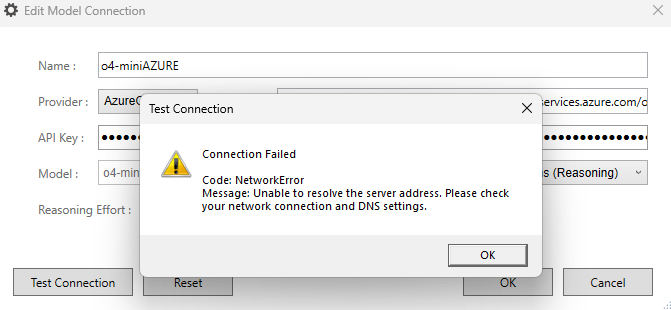
    With the new plugin version I first could not connect anymore, see the screenshot with the error. I tried several times.When trying after some minutes again, connection was successful and I was able to process some segments. Then again I lost the connection. Seems to be still a stop and go situation.

    Bruno

    Screenshot of the Edit Model Connection window showing a Test Connection error. The error message reads: 'Connection Failed. Code: NetworkError. Message: Unable to resolve the server address. Please check your network connection and DNS settings.'

    emoji


    Generated Image Alt-Text
    [edited by: RWS Community AI at 12:55 PM (GMT 1) on 29 Aug 2025]
  • Hi  , Understood.  Sorry to hear that this issue is still persisting for you on your end.  I'm not confident that this is something we can fix if it's a network issue on your end.  Might also be that the connection is limited to tokens per min?

    Can you forward the OpenAI and Studio logs, maybe there is something that we're not seeing?

    Patrick Andrew Hartnett | Developer Experience | Team Lead | RWS Group

    emoji
  • Hi  , yes, pls send to phartnett@rws.com but probably better to upload them somewhere like dropbox or onedrive + include links in the e-mail so that I can download them.  The e-mail might get blocked if you add attachments

    Patrick Andrew Hartnett | Developer Experience | Team Lead | RWS Group

    emoji
  • Hi  , I changed DNS settings on my side, since then the connection seems to be stable. Strangely enough I did not have any issues with other applications or platforms.

    Thank you for updating the plugin.

    Bruno

    emoji
  • Hi  , great the hear and makes sense how you resolved this.

    I reviewed yr log, but couldn't identify anything other than a failure with yr client unable to resolve the ms hostname.

    Error: “The remote name could not be resolved: 'cn-diction-openai-poc-resource.cognitiveservices.azure.com'

    This bascially means the yr client canot resolve the hostname via DNS. The HTTP stack never reached Azure (so it’s not an API/version/key/model issue).

    Let's put this issue to bed... we've spent enough time on it.

    Patrick Andrew Hartnett | Developer Experience | Team Lead | RWS Group

    emoji
Reply
  • Hi  , great the hear and makes sense how you resolved this.

    I reviewed yr log, but couldn't identify anything other than a failure with yr client unable to resolve the ms hostname.

    Error: “The remote name could not be resolved: 'cn-diction-openai-poc-resource.cognitiveservices.azure.com'

    This bascially means the yr client canot resolve the hostname via DNS. The HTTP stack never reached Azure (so it’s not an API/version/key/model issue).

    Let's put this issue to bed... we've spent enough time on it.

    Patrick Andrew Hartnett | Developer Experience | Team Lead | RWS Group

    emoji
Children
No Data