Trados Analyse App error when launching

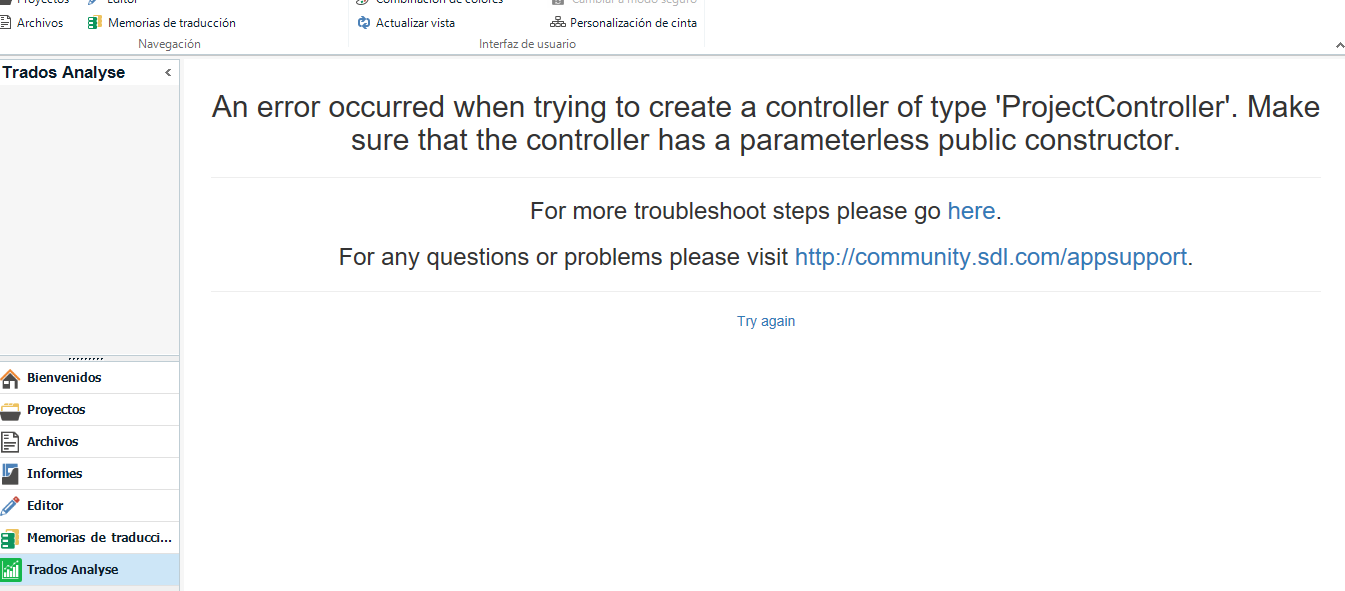
When trying to launch the Trados Analyse app I got the message "An error occurred when trying to create a controller of type 'Project Controller'. Make sure that the controller has a parameterless public constructor".

Trados Export Analysis Reports plugin wont work either. The project list is empty.

These 2 were working just fine, but I had to reinstall Windows, when I reinstalled Studio, the plugin and the app stopped working.

I checked and I have the latest versions. I run Windows 10 and Trados Studio2021 SR2 - 16.2.9.9198.

Any ideas? Thanks so much for your help!

emoji
Parents
  • Hi  ,

    Please remove the plugins from these locations: 

    C:\username\Appdata\Roaming\SDL\SDL Trados Studio\16
    C:\username\Appdata\Local\SDL\SDL Trados Studio\16
    C:\ProgramData\SDL\SDL Trados Studio\16

    Then install them again from the integrated appstore within Studio. This will ensure you'll only install the versions matching your Studio version.

    If the error persists, please attach the full stack error, so we can check the details of the error:

    Hope this helps,

    Oana

    Oana Nagy | QA Engineer | RWS Group

    emoji
  • Hi Oana,

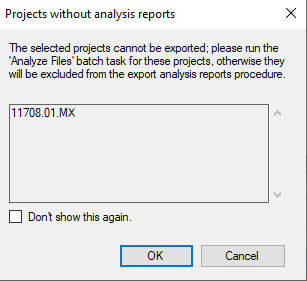
    Thanks for your answer. Unfortunately it's still not working. I have some issues with my pc, so I have to reinstall OS. I have installed Studio 2021 from scratch and tried installing the add-on directly from Studio. But it does not work. The list of projects is empty when I select Trados Export Analysis Report. Also Trados Analyse gives me an error message. See screenshots attached. Thanks for your help.

    Error message in Trados Studio stating 'Projects without analysis reports' with instructions to run 'Analyze Files' batch task.

    Trados Studio error message 'An error occurred when trying to create a controller of type 'ProjectController'' with a link for troubleshooting.

    emoji


    Generated Image Alt-Text
    [edited by: Trados AI at 12:28 AM (GMT 0) on 7 Mar 2024]
Reply
  • Hi Oana,

    Thanks for your answer. Unfortunately it's still not working. I have some issues with my pc, so I have to reinstall OS. I have installed Studio 2021 from scratch and tried installing the add-on directly from Studio. But it does not work. The list of projects is empty when I select Trados Export Analysis Report. Also Trados Analyse gives me an error message. See screenshots attached. Thanks for your help.

    Error message in Trados Studio stating 'Projects without analysis reports' with instructions to run 'Analyze Files' batch task.

    Trados Studio error message 'An error occurred when trying to create a controller of type 'ProjectController'' with a link for troubleshooting.

    emoji


    Generated Image Alt-Text
    [edited by: Trados AI at 12:28 AM (GMT 0) on 7 Mar 2024]
Children
No Data