Unable to re-import translated .txt / .csv file in Passolo

Good morning,

We seem to be having an issue with Passolo 2022:


We have added Arabic as one of ​our application's supported languages. I have exported the source strings (from .dll files) using the export manager in Passolo. I used the 'Customizable text export' to produce a .csv file.
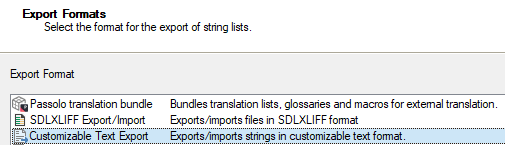
 Export Formats window in Passolo showing options: Passolo translation bundle, SDLXLIFF ExportImport, and Customizable Text Export selected.

The file was then fully translated and Arabic translations are visible when opening in Excel or text editor. 
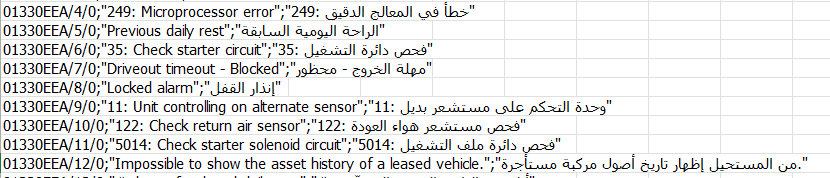
Screenshot of a CSV file showing error codes and messages in English and Arabic, including '249: Microprocessor error' and its Arabic translation.

However, when re-importing the file back to Passolo, the import succeeds, but the translated strings are not displayed in the Translation column, it's still in English.

I have tried converting the file to different formats UTF-8, UTF-16, ... , even used concatenate to produce the exact same format as the exported file, but nothing seems to solve it.
Even replacing just 1 string in the original final, doesn't make it display when re-importing

Also tried the suggestions here, but no luck.

Anyone who can provide some further insights or assistance?


Generated Image Alt-Text
[edited by: RWS Community AI at 12:03 PM (GMT 1) on 19 Jun 2026]
emoji
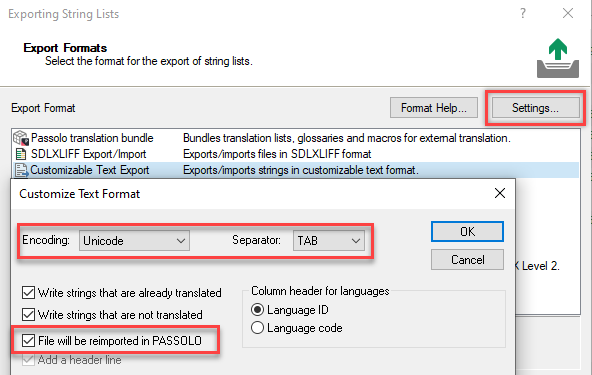
  • The Customizable Text Export feature can be used for many use cases; while it is suitable for communicating with translators, the export settings must be configured correctly for the import to work properly. Before exporting, you need to open the Export settings and preferably use these settings. The most important setting is that the File will be reimported in PASSOLO setting is activated. This creates a header line in the export file with information that controls the import. 

    Screenshot of the Export Formats window in PASSOLO, showing options for exporting string lists. The Customize Text Format dialog is open, with 'File will be reimported in PASSOLO' checked.

    Try to re-export with the recommended settings, then manually insert the translations from the existing translation file.

    For future translation workflows, try to use the SDXLIFF Export/Import and ask your supply chain translators whether they are able to handle this file format.

    emoji


    Generated Image Alt-Text
    [edited by: RWS Community AI at 10:09 AM (GMT 1) on 23 Jun 2026]