Passolo changed values in .NET files that should not have been changed during file generation

source file--InvAIRLookContent.dll

target file--InvAIRLookContent.resources.dll

  1. This file includes a value named `IsSynchronizedWithCurrentItem`, defined as `true` in the source file. We did not process this value in Passolo, only translating the strings within the file. However, during file generation, this value changed to `false`, causing an issue in our product:[INVGEN-81390] WWL:GLOB: Update button doesn't work in Chinese simply build - Autodesk, Inc. JIRA
  2. We processed files in 12 localized languages using Passolo, and only the CHS files have this issue—all others worked fine.
  3. This problem has existed for several years. I'm currently using Passolo version is 22.0.248.0.
  4. I've attached the complete source files, LPU, the CHS file(have issue), and the JPN file(no issue) here: Passolo issue.zip

Please help check this issue.

Thanks

English Source (Correct):
 
 
<inv:InvFlowRibbonSplitButton x:Uid="inv:InvFlowRibbonSplitButton_2"
Id="AppUpdateCmd" Text="Update" IsSplit="True"
IsSynchronizedWithCurrentItem="True"   <!-- CORRECT -->     
ShowText="False" Size="Standard" IsVisible="True" ToolTip="Update">
 
 
Chinese Localized DLL (Incorrect):
 
<inv:InvFlowRibbonSplitButton x:Uid="inv:InvFlowRibbonSplitButton_2" 
    adw:RibbonItem.Id="AppUpdateCmd" adw:RibbonItem.Text="更新" 
    adw:RibbonListButton.IsSplit="True" 
    adw:RibbonListButton.IsSynchronizedWithCurrentItem="False"   < !{}(WRONG){}  >
    adw:RibbonItem.ShowText="False" adw:RibbonItem.Size="Standard" 
    adw:RibbonItem.IsVisible="True" adw:RibbonItem.ToolTip="更新">

emoji
Parents
  • Hi Tina,

    For such request please use the support system and raise a support case:

    https://gateway.rws.com/csm

    As for the current issue,

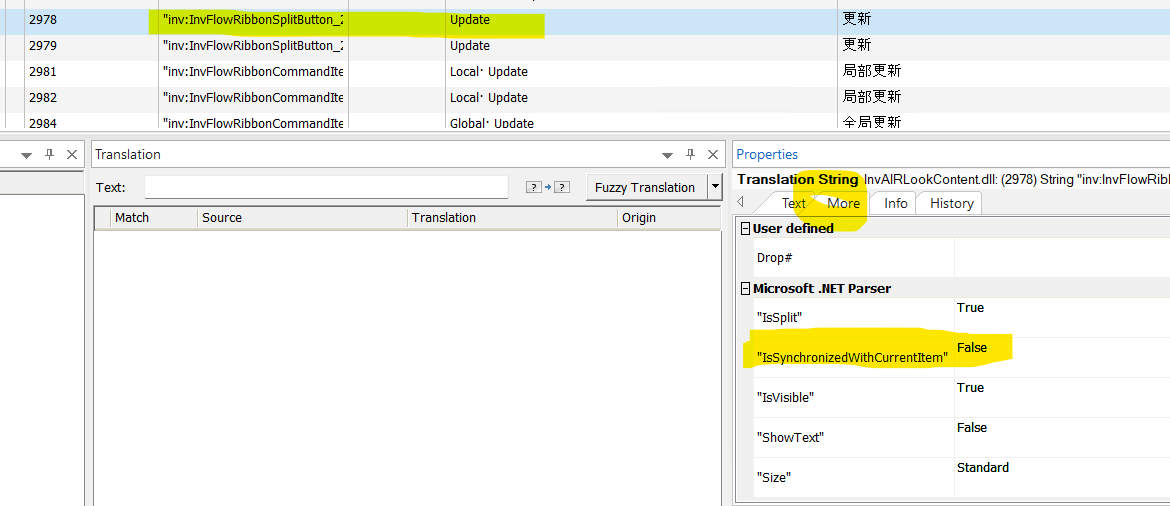
    the value for IsSynchronizedWithCurrentItem is set as false in the More tab of the string:

    Screenshot showing a translation tool interface. The highlighted text includes 'Update' and 'IsSynchronizedWithCurrentItem' set to 'False' in the 'More' tab under 'Microsoft .NET Parser'.

    It's normal in this case to write it as False. 

    I assume this was changed at some point in past and you can revert it back to True if this is the intended value.

    Let me know if this helps or if you require further assistance.

    Thanks,

    Adrian Maniu

    emoji


    Generated Image Alt-Text
    [edited by: RWS Community AI at 10:39 AM (GMT 0) on 12 Feb 2026]
Reply
  • Hi Tina,

    For such request please use the support system and raise a support case:

    https://gateway.rws.com/csm

    As for the current issue,

    the value for IsSynchronizedWithCurrentItem is set as false in the More tab of the string:

    Screenshot showing a translation tool interface. The highlighted text includes 'Update' and 'IsSynchronizedWithCurrentItem' set to 'False' in the 'More' tab under 'Microsoft .NET Parser'.

    It's normal in this case to write it as False. 

    I assume this was changed at some point in past and you can revert it back to True if this is the intended value.

    Let me know if this helps or if you require further assistance.

    Thanks,

    Adrian Maniu

    emoji


    Generated Image Alt-Text
    [edited by: RWS Community AI at 10:39 AM (GMT 0) on 12 Feb 2026]
Children