Pretransaltion with DeepL: Update when glossary changes possible?

We use DeeplL Pro for pretranslation. Our client provides us with glossary entries. That is an iterative process, so we got new versions of the glossary every 2,3 weeks.

Passolo with the DeepL-AddIn uses the Glossary entries for untranslated text.

What we would lke to achieve and automate, if possible: Re-Translate strings, that were pretranslated with DeepL before using the new glossary list.

Is this possible?

TIA and Greetings,

Franz-Josef

emoji
  • An application with constantly changing terminology (glossaries) is quite unusual and, above all, I cannot make any statement about 3rd party add-ins here. I assume that the 3rd party add-in is tagging the translated entries accordingly with the correct state.

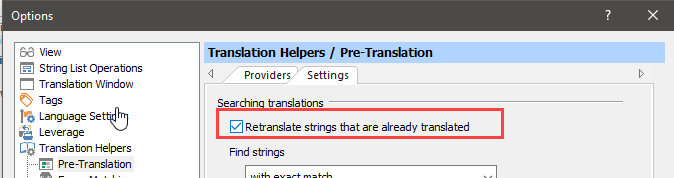
    Entries that have already been translated in Passolo translation lists can be retranslated again. To do this, this option

    Screenshot of an application's Options menu showing Translation HelpersPre-Translation tab with a checkbox labeled 'Retranslate strings that are already translated' highlighted.

    must be activated.

    emoji


    Generated Image Alt-Text
    [edited by: RWS Community AI at 11:15 AM (GMT 1) on 10 Jun 2024]
  • Hi Achim, thank you for pointing me to that option. In my case, it doesn't work since it changes the default PSL behavior to retranslate each and every fragment in all projects. That's not what I need: I need to have the *pretranslated* texts getting pretranslated again during translation build for a *single project. Any chance to do this in Passolo?

    emoji
  • I think that the normal use case assumes that after maintenance of the TM, e.g. due to global changes in the terminology, all entries must be retranslated, not just the entries that are designated here as *pretranslated*. 

    There is no simple automatic option to restrict the desired new pretranslation to the *pretranslated* entries. But this can easily be done manually using a filter and subsequent pre-translation.

    I see the following solution approach for an automation: You can use a macro to reset all *pretranslated* entries to the state *untranslated* and then call up an automatic translation of the entire project via the command line.

    emoji