How to keep consistency between multiple files

Hello,

I have a question. I have several tbulic files from one translation project. The terminologies and translations of these files should be consistent. Is there any way to refer to all the relevant files for Fuzzy Translation and Concordance search? As there are many files, it's not ideal to open all the files and search in each of them.

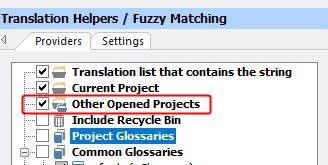
I opened the files in one Passolo window (using File --> Open) and activated "Other Opened Projects" under Translation Helpers/Fuzzy Matching and Concordances in the Options dialog, but it seems it doesn't refer to other files.

It would be great if you can open multiple files in one Editor view like in Trados...

Thanks for your help in advance!

Regards,

Satoe

Parents Reply
  • You can open multiple tbulic files in Passolo and activate that Other Opened Projects are searched when looking for Fuzzy Translation and Concordance:

    Screenshot showing Trados Studio's Translation Helpers with Fuzzy Matching tab. 'Other Opened Projects' option is checked with a red error icon next to it.

    You also can create a new shortcut for Find in Projects. Right-click the ribbon and select Customize Quick Access Toolbar. Click on Customize near Keyboard shortcuts. Select All Commands in the left list than search and select Find in Projects in the right list. Now move the cursor to the Press new shortcut key entry field and press the key combination you want to assign.

    emoji


    Generated Image Alt-Text
    [edited by: Trados AI at 5:45 AM (GMT 0) on 5 Mar 2024]
Children