
How to insert ordinal numbers in French (Mme, Nos, 1er, 1re, 2e, 3e)

Hello,

In Passolo, I am translating strings to French and I need to be able to enter the following ordinal numbers/characters as exponents:
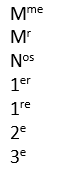
Screenshot of ordinal numbers and characters in French with exponents, including 'Mme', 'Mr', 'Nos', '1er', '1re', '2e', '3e'.

I can type the texts above in my translation editor with the correct format.
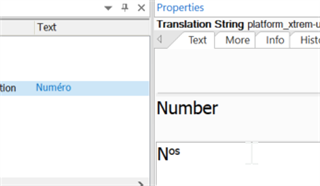
Screenshot of Trados Studio translation editor showing the translation of 'Number' to 'Num ro' without exponent formatting.

But as soon as I validate them, I lose my formating.

I searched for a setting that would auto-correct this formatting but could not find any.

I would be very grateful for any help in that.

Regards.

Catherine Griffin


Generated Image Alt-Text
[edited by: Trados AI at 5:43 AM (GMT 0) on 5 Mar 2024]
emoji
Parents Reply Children
  • Passolo has a fully Unicode compatible editing window and even you are able to insert these character it doesn’t mean that the source and target files are capable to store these formatting. 

    Software resource files are mainly plain text files, therefore such formatting doesn’t make any sense and can’t be stored and dispalyed by the software, except that special Unicode characters exists.

    So again, please contact the project manager or the software manufacturer and clarify whether the software itself is supporting this formatting.