Comments made in Passolo in portable object (PO) files are not propagating to target files or to 2nd LPU in a Passolo cascade

Passolo 16.0.412.0

I am using a cascaded project (P1 & P2) with some portable object (PO) resources in bilingual mode, i.e. where msgid = source and msgstr = translation.
P1 IN = en-us (developerese) P1 OUT = en-us (translatable)
P2 IN = P1 OUT,   P2 OUT =  12 other languages.

I have written comments (to disambiguate strings for the translators) in P1 but they are not propagating to the generated PO target files of P1, nor to the sources of P2. 
The automatic comments from the PO source files #. my comment  are propagating, just not the comments I add in Passolo, whether or not I prefix them with a # character.

The documentation is not detailed here.  Is there some setting or step that I need to make, to allow this to happen? 

What I want is to make my comments only once in P1, and have them available also for the translators of P2.

Thanks in advance for any help
Peter

Parents
  • Before answering the question I want to clarify that Passolo supports 3 different comment fields.

    • Comments that are imported from the source file
    • Comments that are created by project managers in the source string list
    • Comments that are created by translators in the translation list (1 comment filed per target language)

    Where have you inserted your comments?

  • Thanks for the quick answer, Mr Herrmann,
    The first 2 kinds, because "real" translation (i.e. in P2) has not taken place yet.

    1. There are comments already in the source file
    2. And I as project manager (I guess) am trying to add further comments in Passolo to the sources of P1, to help the translators to interpret the GUI strings correctly. 
      I was hoping that these would propagate through to the sources of P2 (i.e. 2nd LPU in the cascade), and even into the target files of P1, but they don't.

    Excerpt from a PO file.  Source file comments are prefixed with #.

    #. Title for dashboard config
    #. Name of route to dashboard config
    msgid "Dashboard configuration"
    msgstr "Dashboard configuration"

  • I tested it, and it works, at least with my latest 2018 version. Comments that you are inserting as a project manager into the source list will be inherited into the comment field of the cascaded project. Can you please check if your comment is a project manager or a translator comment.

  • I double click in the comments cell of a string in the sources in P1.  Passolo prefixes a "C".
    I guess this is a proj mgr comment, as I can make one comment per source string, not one per language.

    Here's what I do in screenshots:

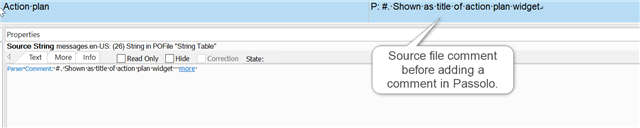
    Initial state in P1

    Initial state in Trados Studio P1 showing source file comment in the comments cell before adding a comment in Passolo.

    Add comment to a source string in P1

    Adding a comment to a source string in Trados Studio P1 where the comment cell is prefixed with 'C' indicating a project manager comment.

    Save and close P1, open P2
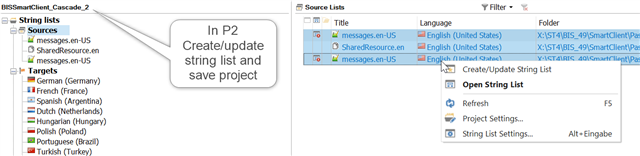
    Select and create/update source strings in P2

    Creating and updating the source string list in Trados Studio P2 with the source-file comment visible but the Passolo comment missing.

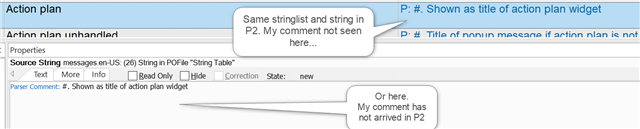
    Look for commented string in sources of P2.  The source-file comment has come over OK, but the Passolo comment I added has been lost.

    Final state in Trados Studio P2 showing the same stringlist and string as in P1 but the added Passolo comment is not displayed.

    emoji


    Generated Image Alt-Text
    [edited by: Trados AI at 5:42 AM (GMT 0) on 5 Mar 2024]
Reply
  • I double click in the comments cell of a string in the sources in P1.  Passolo prefixes a "C".
    I guess this is a proj mgr comment, as I can make one comment per source string, not one per language.

    Here's what I do in screenshots:

    Initial state in P1

    Initial state in Trados Studio P1 showing source file comment in the comments cell before adding a comment in Passolo.

    Add comment to a source string in P1

    Adding a comment to a source string in Trados Studio P1 where the comment cell is prefixed with 'C' indicating a project manager comment.

    Save and close P1, open P2
    Select and create/update source strings in P2

    Creating and updating the source string list in Trados Studio P2 with the source-file comment visible but the Passolo comment missing.

    Look for commented string in sources of P2.  The source-file comment has come over OK, but the Passolo comment I added has been lost.

    Final state in Trados Studio P2 showing the same stringlist and string as in P1 but the added Passolo comment is not displayed.

    emoji


    Generated Image Alt-Text
    [edited by: Trados AI at 5:42 AM (GMT 0) on 5 Mar 2024]
Children