Passolo Translator Edition throws errors and won't save files in multisession Windows

Hi,

We are using several versions of Passolo Translator Edition on multsession Windows Virtual Desktop machines.

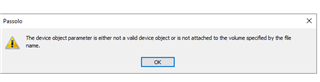
We regularly get Passolo throwing error messages reading "The device object parameter is either not a valid device object or is not attached to the volume specified by the file name"

Also, this often happens in correlation with work being lost - the translator will save manually, close the file, the timestamp will indicated edits, then when the file is reopened, the saved edits will not be there anymore!

I am pretty sure that the multisession environment is causing this, but I can't figure out where and what could be done to work around it. Any ideas or suggestions would be most welcome!

Parents
  • Can you please attach a screen shot of the error message? It doesn't look like an original Passolo message, maybe it is coming from WVD.

    As the tool wasn't explicitly tested and released on WVD it might be something where your IT must introduce measures so that data like registry settings or all the configuration files are kept separate between sessions that run in parallel.

Reply
  • Can you please attach a screen shot of the error message? It doesn't look like an original Passolo message, maybe it is coming from WVD.

    As the tool wasn't explicitly tested and released on WVD it might be something where your IT must introduce measures so that data like registry settings or all the configuration files are kept separate between sessions that run in parallel.

Children