Error - Unterminated string in line

Hello

While testing the possibility to use Passolo 2015 Text Parser with RegEx  to handle Multiline text file, we hit an error I don't know how to handle.

When I'm generating the string list, some 50 files give the ERROR Unterminated string in line 


I checked the files in Notepad ++ but I can't see any dicrepancy or irtegularity.

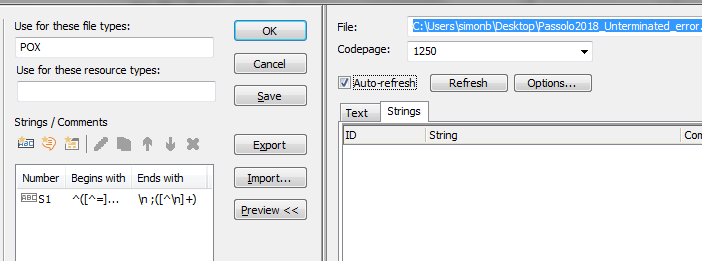
The regex used is:

Begin : ^([^=]+)=
End   :  \n;([^\n]+)


I saw that similar error was supposedly fixed in Passolo 2016 CU4 so I decided to test this on Demo version of Passolo 2018.

Unfortunatley, the behaviour is the same as in Passolo 2016 Team.


This is what I see in preview:
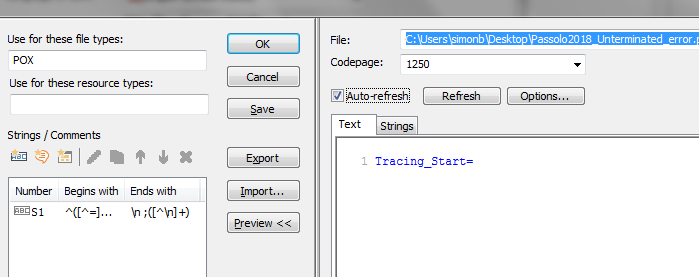


Preview on Strings tab doesn't show any text is parsed.


Tracing_Start=Trace
Tracing_PaneTitle=Tracing

I'm attaching a an example of  problematic files in hope that somebody will have an idea what is causing this problems? and how can we fix this.


Thank you 


Simon 


Parents
  • Hi Simon,

    Thanks for the sample file - extremely helpful. 

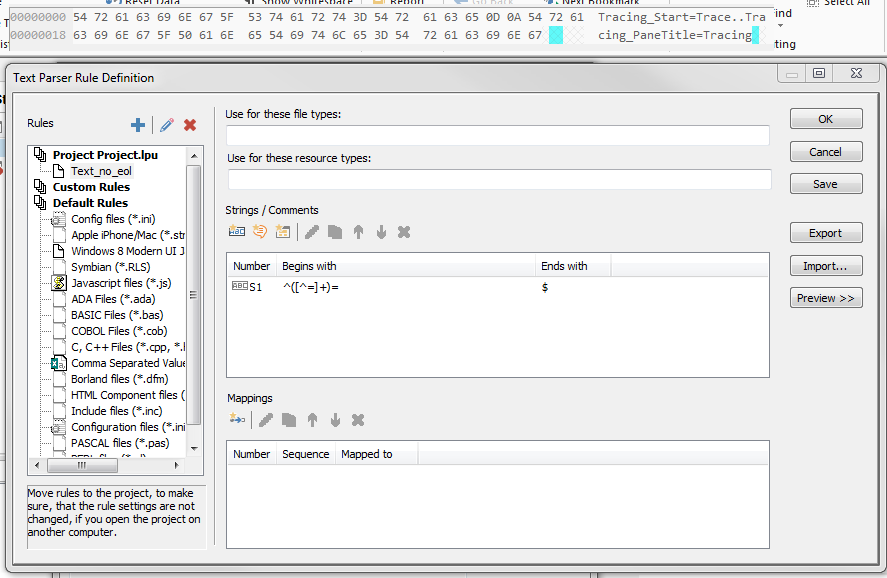
    As you can see below, your sample file did not have end of line for the second line as it does for the first line (0D0A). So in these cases, what you want to use is $ as end of line, NOT \n. Please try the setting below, which works for me with your sample file.

    Trados Studio Text Parser Rule Definition window showing a custom rule with 'String (Comments)' selected, 'Number' set to '1', 'Begins with' empty, and 'Ends with' set to '$'.

    Thanks,

    Naoko

    emoji


    Generated Image Alt-Text
    [edited by: Trados AI at 5:11 AM (GMT 0) on 5 Mar 2024]
  • Dear Naoko

    Thank you for your suggestion and effort in helping me.

    Your suggestion is correct in case the source file would be formatted in the form

    ResourceID=Source string.

    Unfortunately the files we need to process are not strictly formatted as above.  Export from the development may add a comment to the preceding string. This means that there are case where

    ResourceID=Source string
    ; {Locked} This explanation to the string.
    ResourceID=Source string
    ResourceID=Source string
    ; {Locked} This explanation to the string.

    I'm attaching a second file to make it a bit more understandable and also to explain that in the comment line I get the information if string should be translated or not (to be locked).


    BTW: the attached file is again an example of files that give Unterminated string in line  error.


    Passolo_2018_Unterminated_sample2.TXT

  • Hi Simon,

    Thanks for the sample file #2 - very helpful and now I understand what you are trying to achieve. 

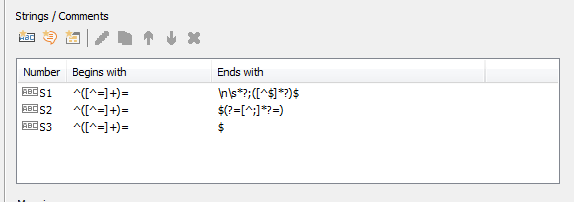
    I updated the parser settings I had as follows:

    Trados Studio parser settings window showing three entries with 'Number', 'Begins with', and 'Ends with' columns.

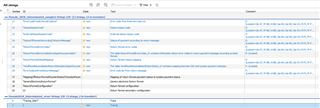
    The extraction looks good:

     Trados Studio extraction results with a list of strings, their source text, and extracted text displayed in a table format.


    Can you try the attached parser file?

    TextParser.zip

    Thanks - Naoko

    emoji


    Generated Image Alt-Text
    [edited by: Trados AI at 5:11 AM (GMT 0) on 5 Mar 2024]
Reply Children
  • Hi Naoko

    First of all I need to apologize as so much time has passed since you wrote your suggestion above.
    Due to an injury I wasn't able to work / didn't have access to computer so I also didn't check the open issues.

    Now, the most important part of my reply is to confirm that your suggestion is the perfect solution to my question and does exactly what I hoped for.

    Thank you very much for this, and even more as I learned something new from you help.

    Thank you

    Simon