
Passolo blocks file on entire system

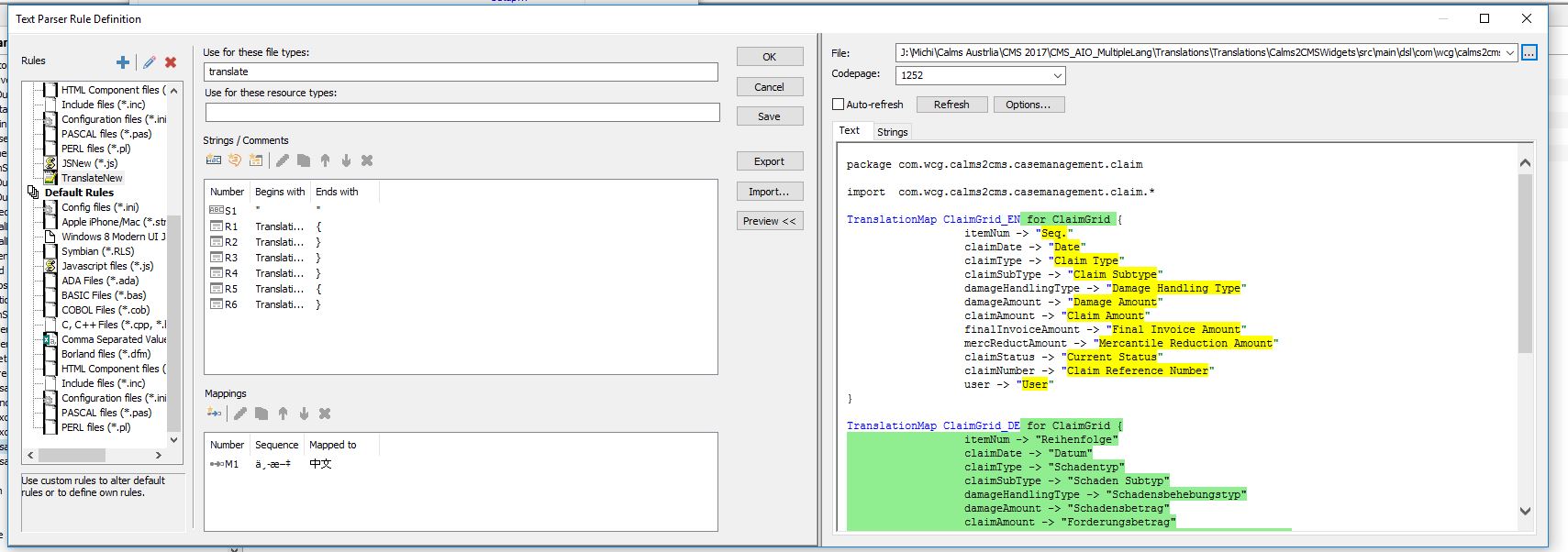
I have a fairly large project consisting of non-standard text-based files for which I wrote a parser. This has worked well for 2 years. But since a few weeks one file that doesn't seem to be different to the others causes problems. If I preview the file in the text parser rule definition dialog BEFORE I add it to the project, everything seems fine. (see screenshot)

As soon as I add the file to the project, the file suddenly shows no translatable strings and Passolo also blocks the file on the entire system (i.e. it can't be renamed, changed, overwritten in ANY application). This can only be rectified by completely closing Passolo (not just the relevant project).

Anything I can do?
 

Parents
  • This is difficult to analyze without the text file and the project. I would assume that this text file is a bit different than the others and that the rule you have created is now not working working properly. Regular expression rules are usually quite edacious and may cause this behavior if not properly matching the file structure.

    I also have other comments when looking at the screen shot.

    • The text file parser doesn't support multilingual files, but the file shown on the screen shot is multilingual
    • The rule that is applied to the file in the screen shot doesn't seem to work properly as it takes the complete DE text block as a resource definition

    I would suggest to log this as a case in the support portal and attached file, parsing rule and project to let the support engineers analyze it in more detail.

  • The rule works for the file until I add the respective file to the project (according to preview), so the file should be ok. Puzzling.
    Regarding the DE text block as resource definition. I'm aware of that and we wrote a script that rectifies this after the target is generated. If you have other suggestions on how to handle this kind of text file they'd be very welcome.
Reply Children
No Data