Change target file name to source file title

Hello,

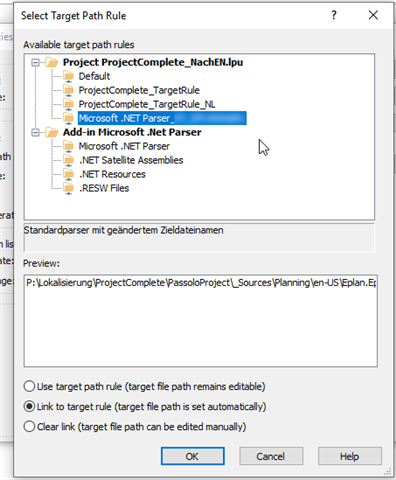
I've got a .NET dll that needs a different file name (original source file name has "export for translation" in it which should be removed). I tried with changing the source file title to the correct name and then adapting the target path rule so that this title is taken. Then I assigned this project-specific target rule to the target string list. But somehow it does not work. still the whole file name is taken. Any idead what I did wrong?

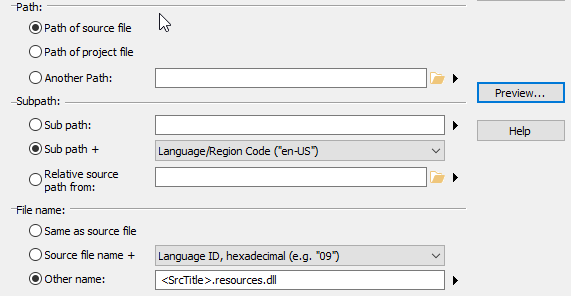
Trados Studio Properties window showing the source list with the title field edited to 'changed the title here' and other settings like parser and language.

Select Target Path Rule dialog box in Trados Studio with various target path rules listed, including 'ProjectComplete_TargetRule_NL' highlighted.

I also wanted to change the file path so another folder is created within or above the language ID folder - is that possible as a relational path to the source file path or would I need to use the "subpath" option and the define a fixed path?

Any help welcome ..:-)

regards

yve


Generated Image Alt-Text
[edited by: Trados AI at 10:34 AM (GMT 0) on 4 Mar 2024]

emoji
Parents Reply
  • Wow, Adrian, such a easy solution, thank you. Worked fine!

    Did not yet realize that you could just change the file path this way  - makes a lot of things easier (always thought I had to treat different file names as new files..). However, I still don't understand the impact of changing the "title" in the string list settings - does it only change the displayed name in the project tree? (In case I had two different files with the same name to process?)

    Thanks a lot! :-)

    yve

Children
  • The title is derived from the file name and used in the string list settings, in the resource tree, and as a column in the file list. It can be used to better organize your navigation as you can change the tree order. 

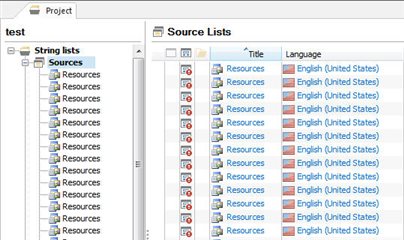
    Some client projects have hundreds of files with the same name (resource.resx or resources.properties) stored in a nested folder structure. That makes is very difficult for project managers and translators to navigate to a specific file.

    Screenshot of Trados Studio showing a project with a list of files named 'Resources' repeated multiple times under 'String lists' and 'Source Lists' with titles derived from file names in English (United States).

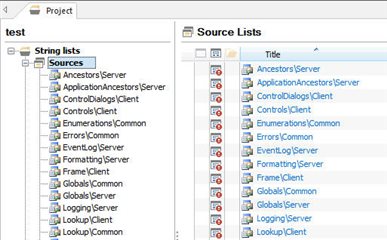
    The team provided customizations to automatically convert the file name into a part of the path.

    Screenshot of Trados Studio displaying a customized file structure under 'String lists' with unique titles like 'AncestorsServer' and 'ApplicationAncestorsServer', making navigation easier for project managers and translators.

    emoji


    Generated Image Alt-Text
    [edited by: Trados AI at 10:34 AM (GMT 0) on 4 Mar 2024]