 Translate


Hi,
is it possible to run the addin.dll from a different folder?
I want the addin.dll to be located in for example C:\temp

Hi,
is it possible to run the addin.dll from a different folder?
I want the addin.dll to be located in for example C:\temp

The reason why I asked this is because I want to install my Add-In on many computers but I don't know how to deal with varying local paths.
The Pass.AddIn.Framework.dll and the Pass.AddIn.Core.dll is located in a different folder depending on which System I am.
Do I need to change this path?
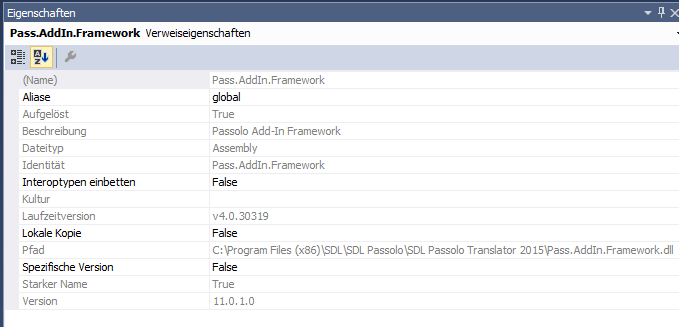
Case:
Computer 1: C:\Program Files (x86)\SDL\SDL Passolo\SDL Passolo 2016
Computer 2: C:\Program Files (x86)\SDL\SDL Passolo\SDL Passolo Translator 2015
Computer 3: C:\SDL\SDL Passolo\SDL Passolo 2016
I could compile my Add-In for each computer with its own paths but is this the only solution?
The reason why I asked this is because I want to install my Add-In on many computers but I don't know how to deal with varying local paths.
The Pass.AddIn.Framework.dll and the Pass.AddIn.Core.dll is located in a different folder depending on which System I am.
Do I need to change this path?
Case:
Computer 1: C:\Program Files (x86)\SDL\SDL Passolo\SDL Passolo 2016
Computer 2: C:\Program Files (x86)\SDL\SDL Passolo\SDL Passolo Translator 2015
Computer 3: C:\SDL\SDL Passolo\SDL Passolo 2016
I could compile my Add-In for each computer with its own paths but is this the only solution?
