
 Translate


Just something that I notice often:
For Groupshare projects that are shared among users, the "Location" path for the Export for Bilingual Review batch task is an absolute path.
This causes problems when multiple reviewers on different PCs want to use this feature. They have to set the location path individually each time they use this Batch Task.
It would be great if the export for review was a relative path set to the project folder like how reports are done or have a separate setting for people who want to specify a hard-coded path.
The settings I am referring to is this one:
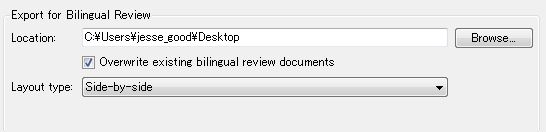
In the above screenshot, if another user on another PC runs Export for Bilingual Review, Trados will try to save to my desktop which does not exist!

