
TS2024 SR1 CU3 (and previous): when opening more than one GS project all projects do get the same name

I work for a customer with GroupShare. When I open more than one project from his server, ALL projects do get the same name. This is completely useless...
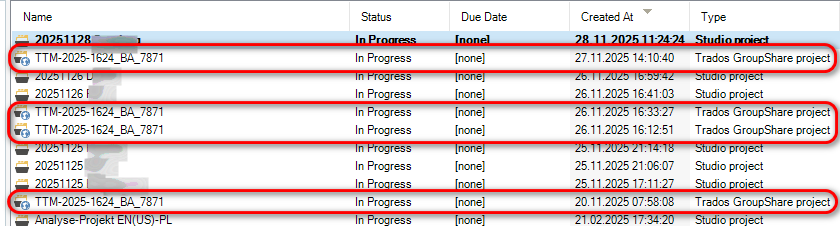
Screenshot showing a list of projects with identical names 'TTM-2025-1624_BA_7871' highlighted in red, all marked as 'In Progress' with 'Trados GroupShare project' type.

How shall one keep track which project is which? All the same... This is a huge bug for me.


Generated Image Alt-Text
[edited by: RWS Community AI at 11:27 AM (GMT 0) on 28 Nov 2025]

emoji

_________________________________________________________

When asking for help here, please be as accurate as possible. Please always remember to give the exact version of product used and all possible error messages received. The better you describe your problem, the better help you will get.

Want to learn more about Trados Studio? Visit the Community Hub. Have a good idea to make Trados Studio better? Publish it here.

Parents
  • Hi Jerzy!

    It's quite a bug :) I've never seen such thing before.

    I tried to open several GS 2020 SR1 projects with Studio 2024 SR1 CU 3 and it works fine.

    What's inside projects.xml file? Are all the projects name the same?

    What GS version uses your customer?

    Try the following:

    Make a copy of projects.xml file located in C:\Users\%username%\Documents\Studio 2024\Projects

    Delete projects.xml and reopen the GS projects.

    Regards,
    Yuri 

    emoji
  •  

    I can share the projects.xml with you. Please write me a private message with your e-mail. I do not know the GS version at my customer.

    _________________________________________________________

    When asking for help here, please be as accurate as possible. Please always remember to give the exact version of product used and all possible error messages received. The better you describe your problem, the better help you will get.

    Want to learn more about Trados Studio? Visit the Community Hub. Have a good idea to make Trados Studio better? Publish it here.

    emoji
Reply Children
No Data
