Hello! Is it possible to create a sub organization that would be restricted to certain users only?


I have create a Sub Organization and added some specific users.

I asked another member of the team (which was not added to the sub organization) to try to open a project created under the sub organization, and he was able to do so. I was expecting the contrary. 

I would like to have this sub organization accessible for specific users only, does someone knows if it is possible?


We are using GroupShare 2020 SR1 and we will upgrade to SR2 soon.

Thanks for you help!

Caroline

emoji
Parents
  • Hi Caroline!

    I believe that “another member of the team” is in Root Organization or level above.
    According to GS documentation “The roles assigned to the users in a root organization propagate to subsidiary organizations.”

    To separate users and resources they should be on parallel suborganizations level like A org. and B org.
    A users won’t see the content of B suborganization and vice versa.

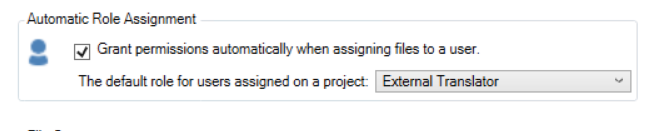
    It' worth mentioning  if user is assigned to a server project and has no access right, it will be given automatically by GS Console Settings
    Screenshot of the Automatic Role Assignment section with a checkbox labeled 'Grant permissions automatically when assigning files to a user' checked. Dropdown shows 'External Translator' as the default role.

    emoji


    Generated Image Alt-Text
    [edited by: RWS Community AI at 7:52 AM (GMT 1) on 22 Aug 2025]
Reply
  • Hi Caroline!

    I believe that “another member of the team” is in Root Organization or level above.
    According to GS documentation “The roles assigned to the users in a root organization propagate to subsidiary organizations.”

    To separate users and resources they should be on parallel suborganizations level like A org. and B org.
    A users won’t see the content of B suborganization and vice versa.

    It' worth mentioning  if user is assigned to a server project and has no access right, it will be given automatically by GS Console Settings
    Screenshot of the Automatic Role Assignment section with a checkbox labeled 'Grant permissions automatically when assigning files to a user' checked. Dropdown shows 'External Translator' as the default role.

    emoji


    Generated Image Alt-Text
    [edited by: RWS Community AI at 7:52 AM (GMT 1) on 22 Aug 2025]
Children