Error: Trados reverted to first version of the file

Hello everyone!

I haven't found any info on why this happens, so I would love some feedback from you:

  • The translator did everything properly, confirmed all segments and did the "check in" process for the file. However, when the PM went through the "check out" process, the project had reverted to the first version of the file, the one we had immediately after the first 'pre-translate'.

I posted here because I only ever had this issue while working with Trados Groupshare and not with packages. We were able to get the right version of the file by using "get specific version", but it is an issue when less experienced PMs access the file and not immediately realize there is an issue or when proofreaders access the file.

So, is there a known cause for this? And how can we avoid it?

Thanks in advance for all your help.

emoji
  • Hi  ,

    I did saw this behavior in the past with an older version of Trados Studio (Studio 2019 SR2 CU5). The workflow was the following:

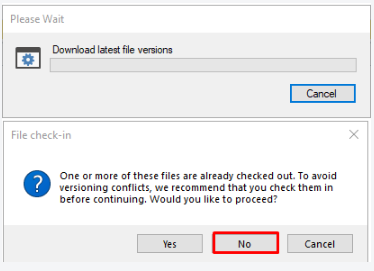
    - the file within GroupShare project was translated and checked in. When the second user opens the project on his/her computer there was a notification message "One or more of these files are already checked out. To avoid versioning conflicts, we recommended that you check them in before continuing. Would you like to proceed?", and the window showed the 3 buttons: Yes/No/Cancel - when pressing Yes or No, the result was the same, and the outdated file version was downloaded.

    Trados Studio notification message stating 'One or more of these files are already checked out. To avoid versioning conflicts, we recommend that you check them in before continuing. Would you like to proceed?' with Yes, No (highlighted), and Cancel buttons.

    If the user has this Trados Studio version (Studio 2019 SR2 CU5), then my recommendation will be to update Trados Studio to the latest version in order to avoid this behavior to arise in the future. The latest update (Trados Studio 2019 SR2 CU8) can be downloaded from here: https://downloadcentercdn.sdl.com/TP/Trados/T2019/SR2/CUs/CU8/SDLTradosStudio2019_SR2_CU8_3007.zip .

    I hope this helps.

    Alex J.

    emoji


    Generated Image Alt-Text
    [edited by: Trados AI at 7:07 AM (GMT 0) on 5 Mar 2024]
  • Hi Alex! Thanks for your response!

    The project was creating using Trados Studio 2021, I don't know the version used by this specific translator, as he is an outside vendor. But the PM who checked out the file afterwards (when it was actually reverted) uses Trados Studio 2021 as well. Any recommendations in this case? Or any idea what may have caused this in our case?

    Our LSP uses, exclusively, Trados Studio 2021 (though the specific release may vary from user to user as some people are better about keeping it up-to-date), but it is hard to "demand" newer versions from outside vendors.

    emoji
  • Maybe the PM had the project already in the Trados Studio projects list and he/she did not click on Get Latest Version. I cannot think of any other reason why the project was not synchronized properly.

    Alex J. 

    emoji
  • Thank you for the help, anyway! I'll keep an eye out to take screenshots if it happens again.

    emoji
  • Dear colleagues   and  , it's nice to e-greet you.

    I've been having this same problem with my two latest GroupShare assignments.

    I do the translation with the translation user, check out, use the exclusive mode (no warnings about other users), complete the translation (it shows 100% progress). Check-in again (leave at Translator stage for organization purposes with my reviewer) and it goes back to unchecked, shows 100% progress and then reverts to the original version, without any progress. Everything stays in the TM but doesn't seem to stay in the project.


    I'm using Studio 2022 Beta SR2 and my colleague uses Studio 2021. The first time it happened I had opened the project twice in two different computers. Checked in the first one before re-opening it. When I opened it in the second computer, it was already undone but I didn't pay much attention to it. I attributed this and the whole situation to my opening it twice. Then the apparently empty delivery.

    Then today I've just finised a new assignment and the same happened.

    When my colleague opens it up in their computer, it's blank and the TM shows the 100%, CM and so on; and after pretranslating, the 100% progress stays on their end. Does that make sense? Is it probably because they open the package before I do (which has happened before without weird behaviors)?

    Anyways, if you happen to have a solution to this or have a more plausible theory than mine, I'll be very thankful to know about it.

    Thanks and have a great day!

    Martín

    emoji