Translate


Hi,
When working with server bases TM the translation results were added, but on the stage of finalizationFailed to update server TM.xlsx I got the error attched.
Thanks for your support,
nika


Hi,
When working with server bases TM the translation results were added, but on the stage of finalizationFailed to update server TM.xlsx I got the error attched.
Thanks for your support,
nika
Hi Nikoloz Jashi,
Are you seeing this error message with all the server based TM's?
What version of Trados Studio/GroupShare are you using?
Can you share the expended error message trace from Trados Studio?
Alex J.

Hi Alex,
I have GS 2017 SP1 CU8 and Studio 2019 SR2 15.2.8.3007. Also, I have 2021 but this is not the version I work on the project from right now.
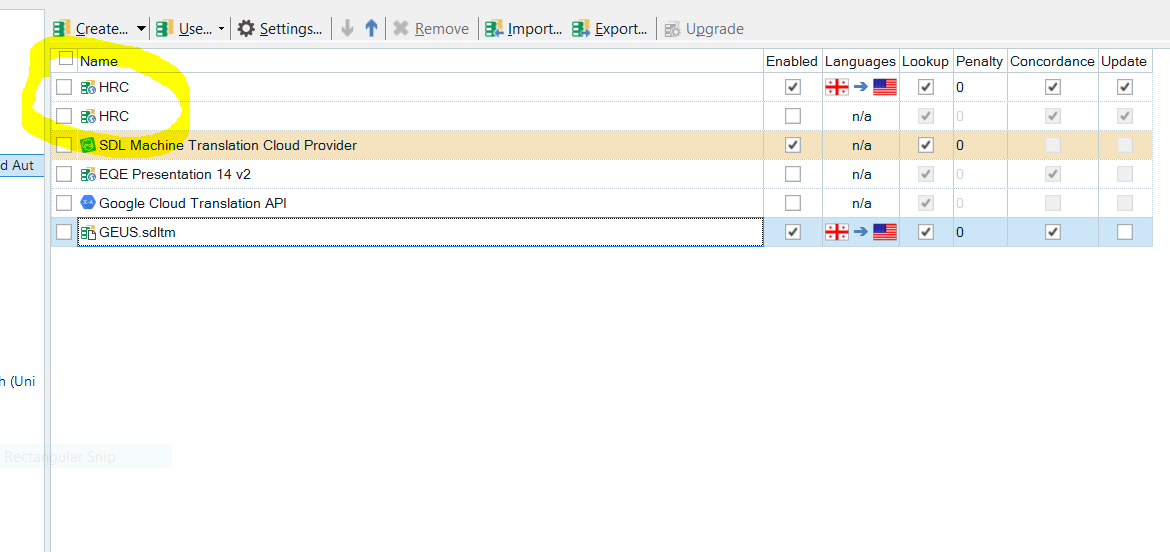
The reason for the conflict with the server TM must stem from the fact of adding the server TMs in a specific way in translation memories settings under all language and specific language. I know we have to put tms in one of them but not both. After manipulating with memories the massage occurred. Now, the needed sever TM is shown twice in the tm view of the project settings. The TM though works without any problems with fail to update servet TM.xlsxserver-published files while making the error with those published locally. I attach the error report
Thanks,
nika

Hi Alex,
I have GS 2017 SP1 CU8 and Studio 2019 SR2 15.2.8.3007. Also, I have 2021 but this is not the version I work on the project from right now.
The reason for the conflict with the server TM must stem from the fact of adding the server TMs in a specific way in translation memories settings under all language and specific language. I know we have to put tms in one of them but not both. After manipulating with memories the massage occurred. Now, the needed sever TM is shown twice in the tm view of the project settings. The TM though works without any problems with fail to update servet TM.xlsxserver-published files while making the error with those published locally. I attach the error report
Thanks,
nika
Hi Alex
Sending the TM view from project settings. You will notice two same server TMs added which is added bu default. After I try to manipulate with the TMs, remove them of change the sequence of order, the error appear once returned to editor view and confirming any segment. At the moment I cannot reproduce the error as I added filed bases memory to the project. Once I have the error I shall send it as well.
Thanks for you kind support,
NJ