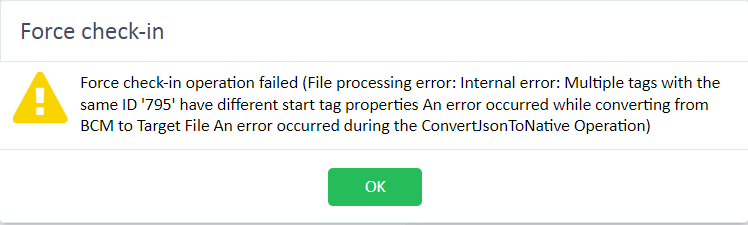
Online Editor issues - unable to check-in document

Hi!

I work for a LSP using Groupshare and Trados Studio 2021. We use Online Editor for freelance translators that do not have a Trados Studio license themselves, but today we had a huge issue with a project and I would some input from you.

The translator used Online Editor to translate approximately 12k words in a PowerPoint presentation. But when he tried to check-in the file, he received the following error:
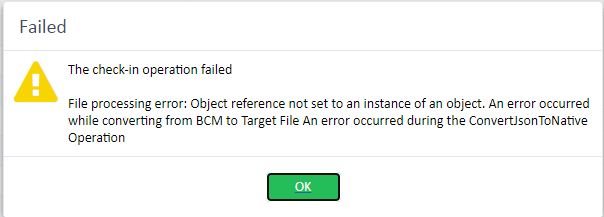
Error message in Trados Studio stating 'The check-in operation failed' with details about a file processing error related to object reference and conversion operation.

An attempt at downloading the file produced the same error.

I checked the Project Memory and it was not updated with his translation (I don't know if per a bug from Online Editor or by mistake of the translator), so adding a copy of the file to the project and running Pre-Translate did not solve my problem.

Project Manager was unable to force/undo check-out, even via the Groupshare website.

When we open the file on Groupshare, it shows as 100% completed, but on Trados Studio, it shows as 17% completed.


Trados Studio Online Editor interface showing a PowerPoint translation project with 13,849 words, 1,377 segments, 99.93% complete, and one untranslated segment.

Trados Studio project view indicating a PowerPoint file with 12,019 words at 17% translation progress and file status 'In Translation'.

Any tips on how we can solve this in the future? Or on what can cause this type of error?

Due to our short deadline, we had to copy the translated text to a new document, but that is obviously not the ideal solution.

Thanks in advance!


Generated Image Alt-Text
[edited by: Trados AI at 7:03 AM (GMT 0) on 5 Mar 2024]

emoji
Parents
  • Any new ideas on this issue?

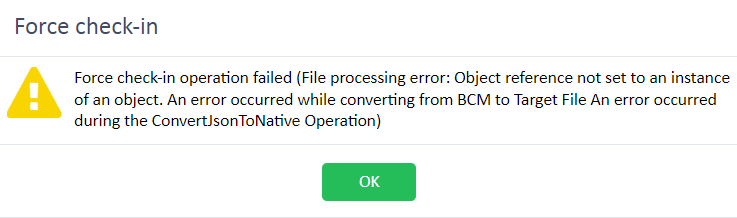
    This has been recurring for us, and it is a real hassle, as we are unable to force check-in or undo check-out. I don't think it has to do with the size of the file, because it has now done the same thing with a Word File with less than 2MB. It did have a lot of tags, which the translator copied to the target segment.
    Error message in Trados Studio during force check-in stating 'Force check-in operation failed (File processing error: Object reference not set to an instance of an object. An error occurred while converting from BCM to Target File An error occurred during the ConvertJsonToNative Operation)' with an OK button.

    emoji


    Generated Image Alt-Text
    [edited by: Trados AI at 7:03 AM (GMT 0) on 5 Mar 2024]
Reply
  • Any new ideas on this issue?

    This has been recurring for us, and it is a real hassle, as we are unable to force check-in or undo check-out. I don't think it has to do with the size of the file, because it has now done the same thing with a Word File with less than 2MB. It did have a lot of tags, which the translator copied to the target segment.
    Error message in Trados Studio during force check-in stating 'Force check-in operation failed (File processing error: Object reference not set to an instance of an object. An error occurred while converting from BCM to Target File An error occurred during the ConvertJsonToNative Operation)' with an OK button.

    emoji


    Generated Image Alt-Text
    [edited by: Trados AI at 7:03 AM (GMT 0) on 5 Mar 2024]
Children