How do I know which version of Online Editor my GS 2020 uses?

Hi

Since GroupShare 2020, there are two versions of the Online Editor.

How do I know which version is used. According to the Help, only one version can be used throughout GroupShare, but where do I see which one it is and how can I configure it.

The Product Activation says "Full", does this mean it uses the "Advanced" version?

Parents
  • Hi Walter, 

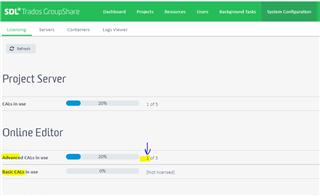
    from the admin point of view, perhaps you can have a look at your GroupShare Dashboard.

    In the System Configuration > Licensing, you can check which OE CAL type is consumed. 

    Trados GroupShare dashboard showing Licensing section with Project Server CALs in use at 20% and Online Editor Advanced CALs in use at 20%. A warning icon indicates 0 out of 5 Basic CALs licensed.

    I believe you can also understand from the user point of view as Basic CAL for OE has less features. 

    Feature set can be found at this link.

    Regards, 

    Simon

    emoji


    Generated Image Alt-Text
    [edited by: Trados AI at 6:50 AM (GMT 0) on 5 Mar 2024]
Reply
  • Hi Walter, 

    from the admin point of view, perhaps you can have a look at your GroupShare Dashboard.

    In the System Configuration > Licensing, you can check which OE CAL type is consumed. 

    Trados GroupShare dashboard showing Licensing section with Project Server CALs in use at 20% and Online Editor Advanced CALs in use at 20%. A warning icon indicates 0 out of 5 Basic CALs licensed.

    I believe you can also understand from the user point of view as Basic CAL for OE has less features. 

    Feature set can be found at this link.

    Regards, 

    Simon

    emoji


    Generated Image Alt-Text
    [edited by: Trados AI at 6:50 AM (GMT 0) on 5 Mar 2024]
Children
No Data