Translate


Hello,
is there a way to view in the reports how much percentage was
a) translated with NMT/Machine Translation (language cloud, DeepL, other plugings)
b) translated with NMT/Machine Translation but corrected by translators?
Thx,
Kind regards
Daniel


Hello,
is there a way to view in the reports how much percentage was
a) translated with NMT/Machine Translation (language cloud, DeepL, other plugings)
b) translated with NMT/Machine Translation but corrected by translators?
Thx,
Kind regards
Daniel
Daniel Ihrig
The Analysis report does confirm how many segments are new and therefore by extension completed using NMT
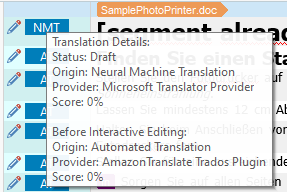
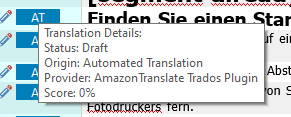
Annoyingly the context pane does reflect which provide was used, but no report that I am aware of that will clarify how many segments were done via LC, DeepL ect.
But to answer
translated with NMT/Machine Translation but corrected by translators?
Post-Edit and Compare is what you need: https://appstore.rws.com/Plugin/15
On a Separate topic, have you seen MT Comparison, that provides you with the ability to pre-translate the project with up to five different Machine Translation providers at a time, and
generate a single report in Excel with the results of each engine side by side.This makes the review of the translations much easier to compare.
Keen to see what others may advise you
Lyds
Oana Nagy | QA Engineer | RWS Group
Daniel Ihrig
The Analysis report does confirm how many segments are new and therefore by extension completed using NMT
Annoyingly the context pane does reflect which provide was used, but no report that I am aware of that will clarify how many segments were done via LC, DeepL ect.
But to answer
translated with NMT/Machine Translation but corrected by translators?
Post-Edit and Compare is what you need: https://appstore.rws.com/Plugin/15
On a Separate topic, have you seen MT Comparison, that provides you with the ability to pre-translate the project with up to five different Machine Translation providers at a time, and
generate a single report in Excel with the results of each engine side by side.This makes the review of the translations much easier to compare.
Keen to see what others may advise you
Lyds
Oana Nagy | QA Engineer | RWS Group

Hey,
thx a lot for the good input. Now I have to learn a bit more, which is fine. :-)
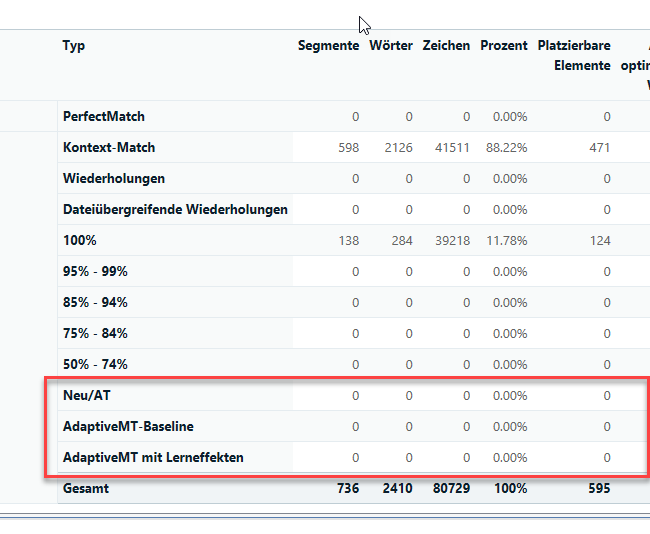
In general I had hoped that I could see that in the standard analysing report here where in this test only 0% are shown, but actually around 70% were translated as a context match coming from NMT.
Have a nice weekend