 Translate


Online help in/for SDL Trados Studio 2021 took a walk. Studio 2021 SR2 should look at docs.rws.com/.../translating-files but does in fact look at docs.rws.com/.../translating-files instead. Time for a hot fix?

RWS Community
Online help in/for SDL Trados Studio 2021 took a walk. Studio 2021 SR2 should look at docs.rws.com/.../translating-files but does in fact look at docs.rws.com/.../translating-files instead. Time for a hot fix?
I'm not sure this is wrong. There is no SR2 specific page for this one:
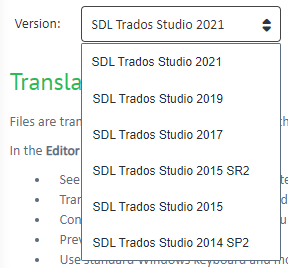
Adding Catalina Adam in case she needs to change anything here.
Paul Filkin | RWS
Design your own training!
You've done the courses and still need to go a little further, or still not clear?
Tell us what you need in our Community Solutions Hub


I should have been clearer. I did hit F1 in Trados Studio on my work laptop and was directed to the bad page address,which lead essentially to a 404. I found the correct one by poking around online and am suggesting that this gets fixed.
Hans-Jochen Trost

Where were you when you hit F1? I don't see this error page. For me I just get a valid help page relating to where I am in Studio.
Paul Filkin | RWS
Design your own training!
You've done the courses and still need to go a little further, or still not clear?
Tell us what you need in our Community Solutions Hub
I'm in the Editor view, source on the left, target on the right, translation memory above, cursor in the target. Hitting F1, or clicking the Help tab, then "Help Topics Online Help", serves up a 404 for the sdl-trados-2021 page address that I have reported. It still does. Going into the Project view or Files view and hitting F1 works correctly, at least does not give a 404.
Trados Studio 2021 SR2 - 16.2.8.9097, installed over the/an original 2021 release some 10-20 days ago.
Addendum to my reply I just posted (went into moderation, so I can't tack onto it directly):
I am in the editor view of a single-file project (an MS Word file). Trados Studio knows about a package with 167 files, which are in progress, i.e., some are translated, some partially, some not at all. My objective of looking into help was to find a way to bulk-erase lots of occurrences of a silly formatting tag pair in the source file. The cursor was in the target.
Thanks Hans-Jochen Trost
I tried in several projects, single file projects and standard projects, different filetypes including Word, but I cannot reproduce this. Hitting F1 or using the Help tab all open the page at the url you provided without any error pages. I wonder if you are using a VPN, or perhaps work inside a controlled domain, or have some security software that might be preventing the ability of Studio to access... or perhaps you can clear your browser cache?
If anyone else can verify this as a problem we can have more confidence but as this is usually one of two things:
I think it makes sense in the meantime to try and see why you specifically cannot access the page because it does seem to work for me.
Paul Filkin | RWS
Design your own training!
You've done the courses and still need to go a little further, or still not clear?
Tell us what you need in our Community Solutions Hub
Once more, to make clarify which page is which and what goes where:
Sitting in the Editor view, F1 directs me to
docs.sdl.com/.../Editor_View
which then forwards to
docs.rws.com/.../translating-files
which gives a 404.
The correct page should be
docs.rws.com/.../translating-files
Now here comes the kicker: Sitting in the Files view, F1 directs me to
docs.sdl.com/.../Files_View
which then forwards to
docs.rws.com/.../managing-project-files
Note that in the Editor view case, I get ultimately a "sdl-trados-studio-2021" page (bad) while in the Files view case I get a "trados-studio-2021-sr2" page. The correct Editor view page ("translating-files") does exist in the sr2 branch.
If I type the docs.sdl.com addresses directly into the browser, I still get the 404 for the Editor view and the correct page for the Files view.
My default browser is Edge because Trados wants to see the Microsoft browser as default. I have cleared out the complete history in it (not a big loss as I am otherwise using Firefox), and the problems did not go away. So I claim that either Trados Studio uses the wrong target, or (now more likely) the target page on RWS/SDL's website has the wrong forwarding address in it.
My connection is Computer -> WiFi -> Router -> ISP's fiber cable out of my house. No VPN or other extra firewalls or other interfaces.
Once more, to make clarify which page is which and what goes where:
Sitting in the Editor view, F1 directs me to
docs.sdl.com/.../Editor_View
which then forwards to
docs.rws.com/.../translating-files
which gives a 404.
The correct page should be
docs.rws.com/.../translating-files
Now here comes the kicker: Sitting in the Files view, F1 directs me to
docs.sdl.com/.../Files_View
which then forwards to
docs.rws.com/.../managing-project-files
Note that in the Editor view case, I get ultimately a "sdl-trados-studio-2021" page (bad) while in the Files view case I get a "trados-studio-2021-sr2" page. The correct Editor view page ("translating-files") does exist in the sr2 branch.
If I type the docs.sdl.com addresses directly into the browser, I still get the 404 for the Editor view and the correct page for the Files view.
My default browser is Edge because Trados wants to see the Microsoft browser as default. I have cleared out the complete history in it (not a big loss as I am otherwise using Firefox), and the problems did not go away. So I claim that either Trados Studio uses the wrong target, or (now more likely) the target page on RWS/SDL's website has the wrong forwarding address in it.
My connection is Computer -> WiFi -> Router -> ISP's fiber cable out of my house. No VPN or other extra firewalls or other interfaces.
ok - I still can't get these errors myself unless I use the error link you provide. I don't use Edge... it's not required by Trados Studio. I prefer Chrome as my default.
Now here comes the kicker: Sitting in the Files view, F1 directs me to
docs.sdl.com/.../Files_View
which then forwards to
docs.rws.com/.../managing-project-files
Which seems fairly logical... I'm not sure where else it should go.
Another question... what language are you running Studio in?
Paul Filkin | RWS
Design your own training!
You've done the courses and still need to go a little further, or still not clear?
Tell us what you need in our Community Solutions Hub
I'm sitting in Texas, running a (US?-)English version of Trados Studio on a US English Win 10 Pro system. I translate to and from German. The English source files can be either British or US.
The kicker is that both the Files View and the Editor View have totally consistent page addresses in the docs.sdl.com tree and inconsistent ones in the docs.rws.com tree.
ok - I'm going to hope Catalina Adam has some ideas here because I'm out of them. I have no idea why this is happening for you.
Paul Filkin | RWS
Design your own training!
You've done the courses and still need to go a little further, or still not clear?
Tell us what you need in our Community Solutions Hub