Translate


Hello,
I was advised by Dejana from the Trados Team to post my request here so that the Licensing Team can investigate my account.
I am a freelance translator using Trados Studio for my daily work.
My original problem started with Trados Studio 2024 Freelance perpetual after a Windows Update.
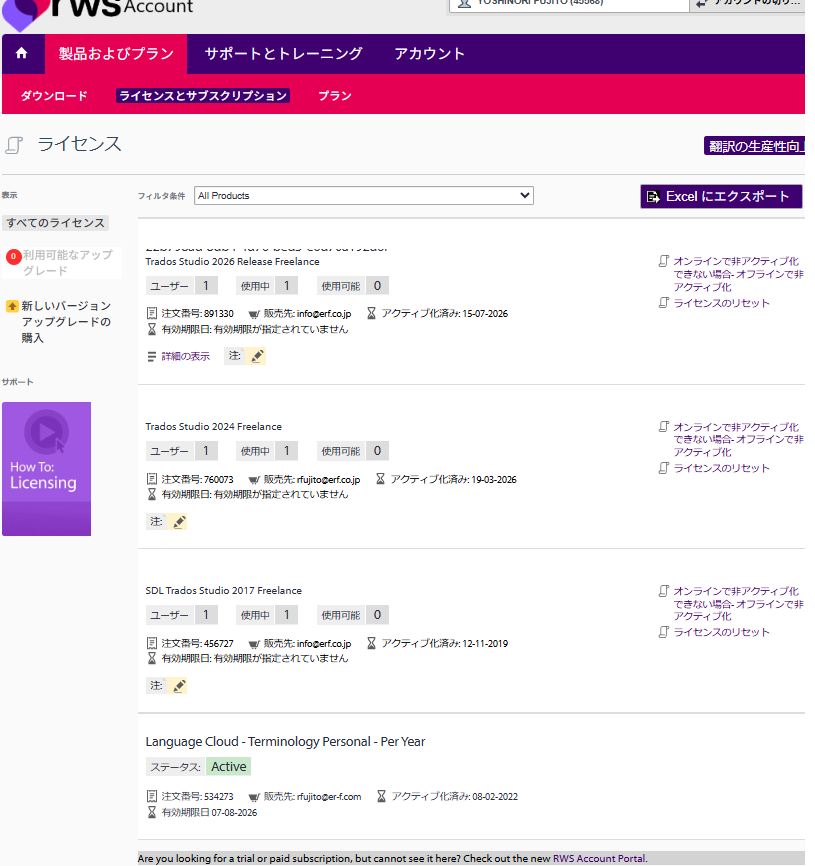
My RWS Account showed:
• Users: 1
• In Use: 1
• Available: 0
I only use one computer.
I reached the maximum number of self-service license resets.
I also tried Offline Deactivation, but it failed.
Because I urgently needed Trados for my translation work, I purchased the upgrade to Trados Studio 2026 Freelance perpetual (JPY 83,000).
Unfortunately, the newly purchased Studio 2026 license also cannot be activated.
My RWS Account now shows:
Trados Studio 2026 Release Freelance
Users: 1
In Use: 1
Available: 0
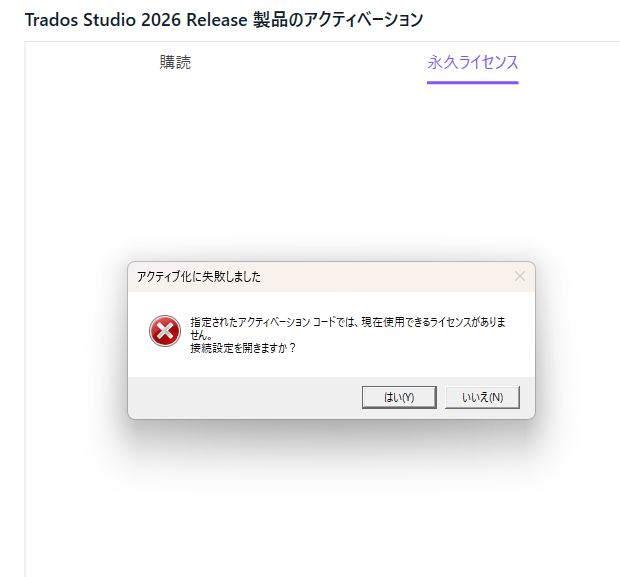
However, Studio 2026 displays the following activation error:
"The specified activation code does not have any licenses available for use."
Therefore:
• RWS Account says the Studio 2026 license is already in use.
• Studio 2026 says there is no license available.
I have never been able to activate or use the newly purchased Studio 2026 license.
Could the Licensing Team please investigate my account and manually correct/reset the activation records for both Studio 2024 and Studio 2026?
This issue is preventing me from carrying out my translation work.
Product:
Trados Studio 2026 Release Freelance
Trados Studio 2024 Freelance
Thank you very much.
Best regards,
Yoshinori Fujito