
Deactivation of one of my Trados Studio 2022 Freelance Plus license

Good afternoon,

I have been trying to deactivate one of my Trados Studio 2022 Freelance Plus license.

I have one license + one extra license.

I managed to deactivate my current license on my main computer directly via Trados Studio.

However, one of my license is still activated on my second computer but it crashed and I am not able to deactivate my second license directly via Trados Studio.

I have tried to deactivate it offline via my account but an error message appears at the bottom, indicating that an error occured and that I have to fill an assistance ticket:
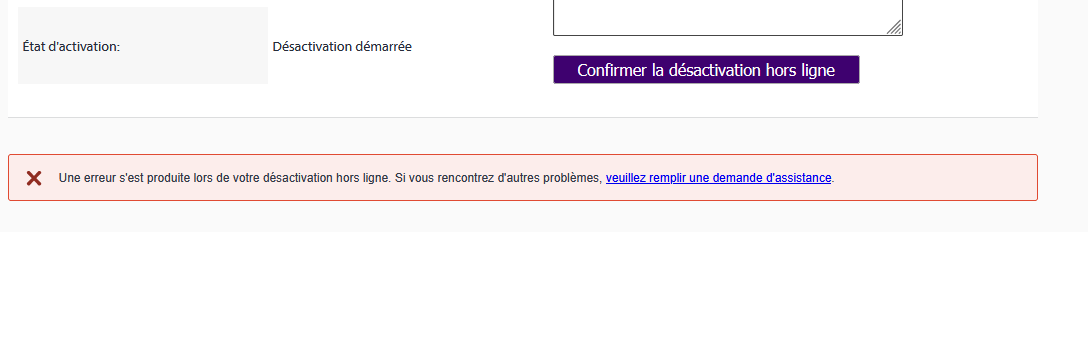
Error message in French stating an issue occurred during offline deactivation, with a link to submit an assistance request. A button labeled 'Confirmer la d sactivation hors ligne' is visible.

I have no support and maintenance contract.

Thank you in advance for your help.

Best regards,

Nathalie Barbier


Generated Image Alt-Text
[edited by: RWS Community AI at 4:44 PM (GMT 0) on 4 Mar 2026]
emoji
Parents
  • Hi ,

    You need to activate Trados first and use the available activation before trying to reset the activation fulfilment that was used on the computer which crashed.

    A screenshot showing license usage details with columns labeled 'Users', 'In Use', and 'Available'. The 'Available' column is highlighted in green with values '0' and '1'.

    If you did not deactivate Trados before the crash of the computer, it means the license in the system is still registered as Activated (our system does not register computer crashes) and you cannot deactivate it if your computer crashed, since Trados is no longer functional there.

    So please first use the available activation fulfilment, after which you can reset the other fulfilment following the steps in the article below, just make sure you select the oldest dated one to reset:

    https://gateway.rws.com/csm?id=kb_article_view&sysparm_article=KB0038545

    Best regards,

    Anca

    Anca Stoian RWS Group

    emoji


    Generated Image Alt-Text
    [edited by: RWS Community AI at 5:40 PM (GMT 0) on 4 Mar 2026]
Reply
  • Hi ,

    You need to activate Trados first and use the available activation before trying to reset the activation fulfilment that was used on the computer which crashed.

    A screenshot showing license usage details with columns labeled 'Users', 'In Use', and 'Available'. The 'Available' column is highlighted in green with values '0' and '1'.

    If you did not deactivate Trados before the crash of the computer, it means the license in the system is still registered as Activated (our system does not register computer crashes) and you cannot deactivate it if your computer crashed, since Trados is no longer functional there.

    So please first use the available activation fulfilment, after which you can reset the other fulfilment following the steps in the article below, just make sure you select the oldest dated one to reset:

    https://gateway.rws.com/csm?id=kb_article_view&sysparm_article=KB0038545

    Best regards,

    Anca

    Anca Stoian RWS Group

    emoji


    Generated Image Alt-Text
    [edited by: RWS Community AI at 5:40 PM (GMT 0) on 4 Mar 2026]
Children

