I cannot find my licence code for studio 2022. My account only shows the code for studio 2024. Where can I find it?

I have trados studio 2024 but I also want the older version on my new computer. I deactivated the code on the old computer, but in my sdl account the only licence code being showed is the one for trados 2024. Where can I find older licence codes? I have "all products" as filter

emoji
Parents
  • Hi 

    When you upgrade your license, it will be updated to the latest version — in this case, 2024.

    Using the same activation code listed under the Licenses tab, you will be able to activate Trados Studio 2024 and Trados Studio 2022, only if both versions are installed on the same PC.

    Please do not hesitate to contact us again if you need any further information.

    Kind regards,

    Ana Sabo | RWS Group

    ___________________
    Design your own training!

    You've done the courses and still need to go a little further, or still not clear? 
    Tell us what you need in our Community Solutions Hub

    emoji
  • Helle Ana,

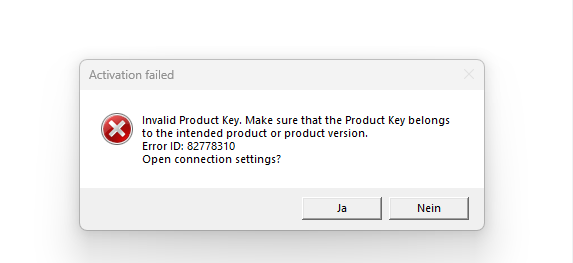
    Thanks! But does this means I can only activate one of both versions? If I copy&paste the activation code for 2024 in the 2022 version, I get an error:Error message window titled 'Activation failed' with text: 'Invalid Product Key. Make sure that the Product Key belongs to the intended product or product version. Error ID: 82778310. Open connection settings?' and buttons labeled 'Ja' and 'Nein'.
    This would be very annoying. I could work with both versions on my other computer and in trados 2024 there seems to be a bug with the autosuggest function. It simply doesn't work properly. Maybe you can help me out?

    Kind regards, Patrick   

    emoji


    Generated Image Alt-Text
    [edited by: RWS Community AI at 12:55 PM (GMT 0) on 18 Feb 2026]
  • Hi 

    You cannot install and activate Trados 2024 and Trados 2022 on separate machines. If you would like to continue running Trados 2022- you must install Trados 2024 on the same machine as they share the same license activation (upgrades only).

    If you are planning to move your Studio license(s) to a new machine, please deactivate Studio 2024 and install it on to the new machine first, activate it and then install Trados 2022.

    Please let me know if you have issues activating both programs on the same PC.

    Ana Sabo | RWS Group

    ___________________
    Design your own training!

    You've done the courses and still need to go a little further, or still not clear? 
    Tell us what you need in our Community Solutions Hub

    emoji
Reply
  • Hi 

    You cannot install and activate Trados 2024 and Trados 2022 on separate machines. If you would like to continue running Trados 2022- you must install Trados 2024 on the same machine as they share the same license activation (upgrades only).

    If you are planning to move your Studio license(s) to a new machine, please deactivate Studio 2024 and install it on to the new machine first, activate it and then install Trados 2022.

    Please let me know if you have issues activating both programs on the same PC.

    Ana Sabo | RWS Group

    ___________________
    Design your own training!

    You've done the courses and still need to go a little further, or still not clear? 
    Tell us what you need in our Community Solutions Hub

    emoji
Children