Activation Studio 2024

Hello,

I have purchased an upgrade to Trados Studio 2024 (Perpetual).
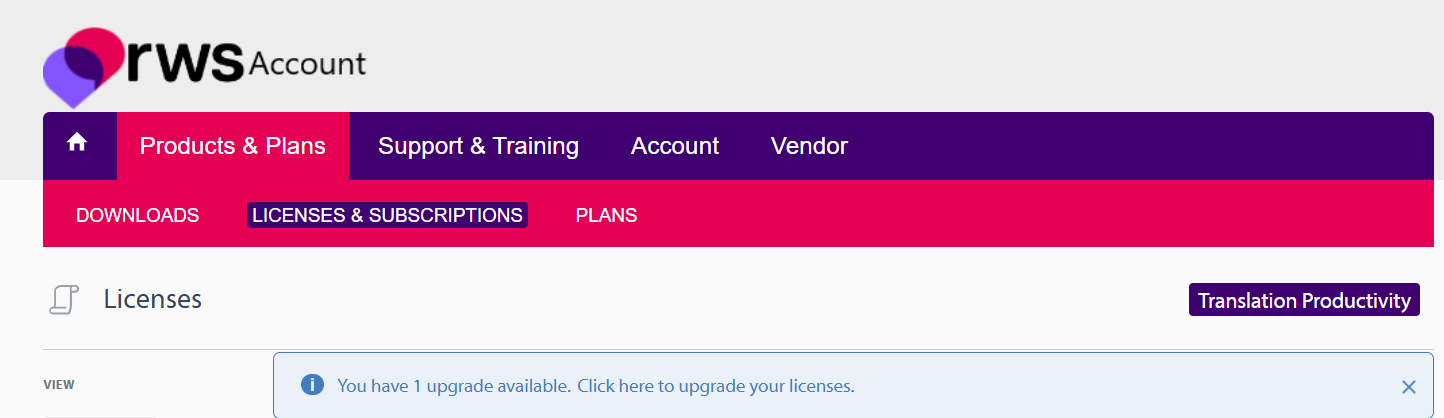
In My Account I see “1 upgrade available”, but Trados Studio 2024 only offers activation by activation code, and no account-based license appears after sign-in.

There is no activation code for this purchase.

Please provision my Trados Studio 2024 perpetual license correctly for account-based activation on my RWS account.

Kind regards,

emoji
  • Hi 

    You need to process the upgrade first in order to have the new activation code for Trados 2024. Please log in your RWS account--> Products&Plans--> Licenses tab and process the upgrade pending.

    RWS Account page showing the 'Products & Plans' tab with 'Licenses & Subscriptions' highlighted. A message reads: 'You have 1 upgrade available. Click here to upgrade your licenses.'

    Once you perform the upgrade to the latest version, you will find the new activation code under License tab.

    Please do not hesitate to contact us again if you need firther assistance or information.

    Kind regards,

    Ana Sabo | RWS Group

    ___________________
    Design your own training!

    You've done the courses and still need to go a little further, or still not clear? 
    Tell us what you need in our Community Solutions Hub

    emoji


    Generated Image Alt-Text
    [edited by: RWS Community AI at 7:54 AM (GMT 0) on 16 Feb 2026]